Tool Handlers Guide
RunPipeline
This section defines how to configure a RunPipeline tool, which executes an RDA pipeline with support for template processing, parameter substitution, and output caching.
custom_config
1. Either pipeline_name or pipeline_content must be provided:
- If pipeline_name is used, it refers to the name of a published pipeline, and only the name needs to be passed.
- If pipeline_content is used, it should contain the full pipeline definition written in RDA pipeline syntax.
2. When pipeline_content is provided, the template_type must be specified:
- Supported values: "jinja" or "mako"
3.The pipeline_output_columns parameter controls which columns are included in the final pipeline output:
- If defined, only the specified column names will be returned.
- If not defined, all output columns from the pipeline will be included by default
| Field | Type | Description |
|---|---|---|
| pipeline_name | string | Name of published pipeline to execute |
| pipeline_content | string | Pipeline content for draft execution using RDA pipeline syntax |
| template_type | string (enum: jinja, mako) | Template engine used in pipeline content |
| pipeline_output_columns | array of strings | Specific output columns to include from the pipeline result |
save_to_cache
Controls whether the pipeline output should be cached. "auto" caches based on output size, "yes" always caches, and "no" disables caching.
cache_line_threshold
The cache_line_threshold sets the number of output lines that must be exceeded for caching to occur when save_to_cache is set to "auto". By default, if the pipeline output has more than 100 lines, it will be cached automatically.
Tool Parameters
Defines the input parameters required by the pipeline (used in templates).
| Field | Type | Description |
|---|---|---|
| name | string | Parameter name used in template substitution |
| type | string (enum: string, integer, number, boolean) | Parameter data type. Default is 'string' |
| description | string | Human-readable description |
| required | boolean | Is the parameter required? Default is false |
| default | string | number |
Example 1
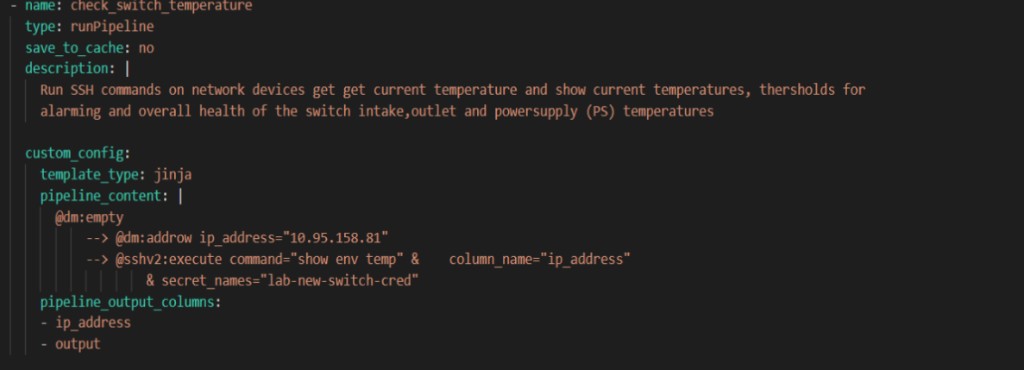
Example 2
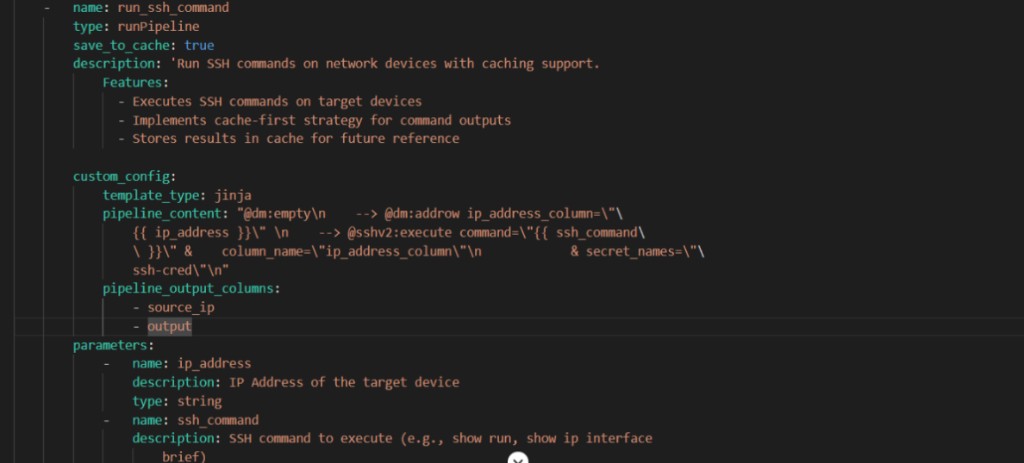
StreamQuery
The streamQuery tool type is designed to query data from a specified stream source(pstream). It allows users to filter and retrieve stream entries based on defined parameters, returning the results in a specified format such as CSV
Predefined-fields
- stream: A string that specifies the name of the data stream to query (e.g., a real-time alert feed). This identifies the source of data to retrieve.
- description: A human-readable string that explains the tool’s purpose, helping users understand what kind of data or functionality the tool provides.
- data_format: Defines the output format of the results. Common options include csv and json, with csv typically used by default.
- response_prefix: A short message added before the query results. Useful in chatbot responses to introduce the returned data meaningfully.
- no_data_message: Specifies the message to display when no matching records are found. This improves user experience by clearly indicating empty results.
- save_to_cache: Accepts values yes or no to control caching behavior. If set to yes, the results are stored for reuse, which can improve performance.
- result_columns: An object that maps internal column names from the stream to user-friendly display labels. Only these columns will be included in the final output, allowing for clean and customized presentation.
- extra_filter: Optional default filter applied automatically to all queries. Can be a static string or dynamic using jinja template which uses flex attributes. Works with parameter filters to restrict records included in the query or aggregation.
| Field | Type | Description |
|---|---|---|
| stream | string | The name of the data stream to query |
| description | string | A short, human-readable description of what this stream query does. |
| data_format | string | Specifies the desired output format of the result set. Default is typically csv. |
| response_prefix | string | A short message to prefix the response data (useful for chatbot responses). |
| extra_filter | string | A filter condition applied to a query. The extra filter can be static or dynamic using jinja template. |
| no_data_message | string | Message to return when the query results in no matching data. |
| save_to_cache | string(yes or no) | Indicates whether to cache the result. If set to yes, query results will be stored for later reuse. |
| result_columns | object | Maps internal column identifiers to user-friendly display names. |
Tool Parameters
Defines the set of input parameters used to filter data from the stream.
| Field | Type | Description |
|---|---|---|
| name | string | Name of the parameter (used for substitution). |
| type | string (optional) | Parameter data type (default is string). Supported types: string, integer, number, boolean. |
| description | string | Human-readable explanation of the parameter’s purpose. |
| operator | string | Operator used in query logic (e.g.,=, contains, before, after). |
| default | string | number |
| queryMapping | string | Query expression showing how the parameter maps to the data fields. Must contain template placeholder ({{parameter_name}}). |
| use_in_cfxql | boolean (Optional) | Indicates if the parameter should be included in the actual query filter logic. |
Example 1
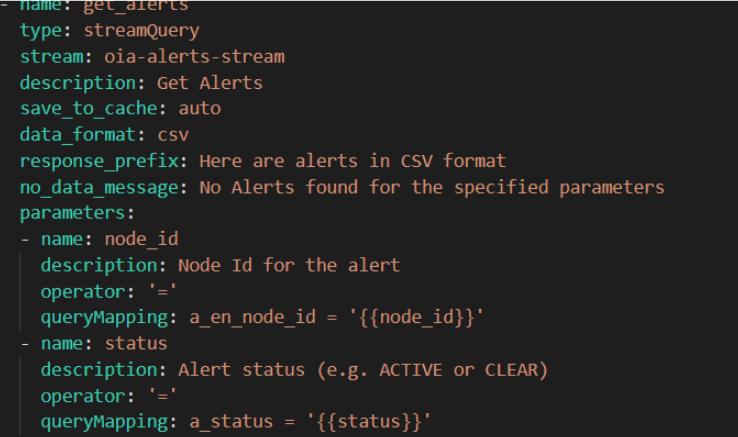
Example 2
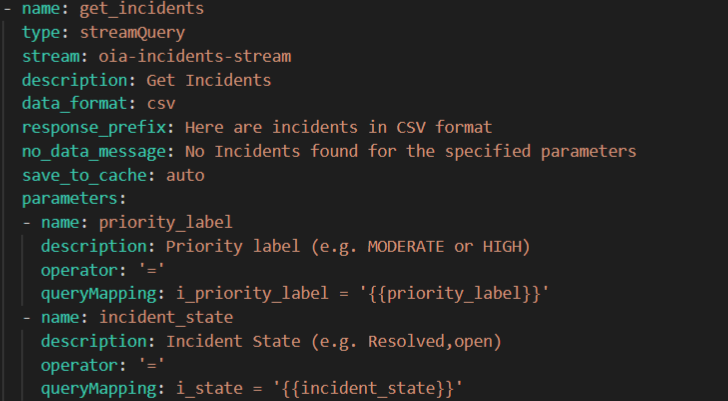
StreamQuery using Flex Attributes:
This section defines how to configure a streamQuery tool, which retrieves data from a specified stream with support for template-based stream selection and output caching.
Predefined-fields
- name: A unique identifier assigned to the tool instance. It is used to reference this specific tool in configurations or executions.
- type: A string that indicates the type of tool being configured. For the StreamQuery tool, this should be set to "StreamQuery".
- description: A human-readable string that explains the tool’s purpose, helping users understand what kind of data or functionality the tool provides.
- save_to_cache: Determines if the tool’s output should be stored in the context cache. Options include "auto" (cache depending on output size), "yes" (always cache), or "no" (do not cache at all).
Fields Supporting Flex Attributes via Templates:
These fields support Jinja templating, allowing you to substitute parameter values dynamically at runtime.
- stream: Dynamically defines the name of the stream to query. The stream name is passed from the parameters section and injected into the tool configuration using a Jinja template like {{ stream }}. The value for stream is provided by the user at runtime through prompt inputs.
Template Use: The field is templated using:
Stream:
template_type: jinja
Template:’{{stream}}’ * extra_filter: Defines an additional static or templated filter applied automatically to all queries. It can use Jinja templates to inject dynamic logicExample:
extra_filter:template_type: jinjatemplate: "status = 'active'"
When combined with user filters, both are joined using logical AND.
Example to dynamically add filter-extra_filter:template_type: jinja
template: ‘{{ filter }}’
The filter field must be defined in the parameter section. * output_document_name: Output cache document name, e.g., {{ doc_name }}. Dynamically names the document where results are saved. This value is also passed at runtime through user prompts or automation logic, making the tool reusable across multiple contexts.
| Field | Type | Description |
|---|---|---|
| name | string | The identifier for the tool. Used for referencing the tool instance. |
| type | string | Specifies the tool type. For this tool, it's: streamQuery. |
| description | string | A short, human-readable explanation of what the tool does. |
| save_to_cache | string | Determines if the stream output should be cached (true, false, or auto). |
| output_document_name | template | Output document name saved in context cache. Supports Jinja or Mako templates. |
| stream | template | Defines the input stream name dynamically via a template. |
| extra_filter | object | (Optional) Defines an additional static or templated filter applied automatically to all queries. It can use Jinja templates to inject dynamic logic. Example: extra_filter: template_type: jinja template: "status = 'active'" When combined with user filters, both are joined using logical AND. Example to dynamically add filter- extra_filter: template_type: jinja template: “{{ filter }}” The filter field must be defined in the parameter section. |
Tool Parameters
Defines the set of input parameters that act as template variables for the tool.
| Field | Type | Description |
|---|---|---|
| name | string | Name of the parameter (used for substitution). |
| description | string (optional) | A human-readable explanation of what the tool does. |
| queryMapping | string | Template showing how this parameter maps to the stream’s data field. Must include {{parameter_name}} which is replaced at runtime. Supports SQL-like operators (=, >, \<,etc.) or stream-specific filter syntax.User provided value is taken to generate the actual query condition |
| operator | string | Defines how the parameter value should be compared in the query.(\<,>,=). Helps build the correct logic automatically in conjunction with querymapping |
| default | string/boolean/number/null | Optional default value for the parameter. Used when the user does not provide the value. |
| use_in_cfxql | boolean | Controls how the parameter is used in CFXQL queries. set to false to prevent this parameter from being directly used in CFXQL queries. Instead, it’s used for template substitution. |
Example 1:
StreamMetadata
This schema defines how to configure a streamMetadata tool, which retrieves the full schema (metadata) of fields available in a specified data stream.This is typically the first tool to be called when querying a stream, as it helps identify what fields exist and how they can be used for filtering.
Predefined-fields
- name: A string that defines the name of the tool instance. This is used as an identifier for referencing the tool in configurations or executions.
- type: A string that indicates the type of tool being configured. For the streamMetadata tool, this should be set to "streamMetadata".
- stream: A string specifying the name of the stream whose metadata should be retrieved. This is the target stream for which the schema information is needed.
- description: A human-readable string that explains what the tool does, helping users understand its role in the overall data pipeline or query process.
| Field | Type | Description |
|---|---|---|
| stream | string | The name of the data stream to query |
| description | string | A short, human-readable description of what this stream query does. |
| data_format | string | Specifies the desired output format of the result set. Default is typically csv. |
| response_prefix | string | A short message to prefix the response data (useful for chatbot responses). |
| no_data_message | string | Message to return when the query results in no matching data. |
| save_to_cache | string(yes or no) | Indicates whether to cache the result. If set to yes, query results will be stored for later reuse. |
| result_columns | object | Maps internal column identifiers to user-friendly display names. |
Example 1 :

Example 2 :
- name: get_alert_meta_data type: streamMetadata stream: oia-alerts-stream save_to_cache: auto description: >- Retrieves the complete schema of alert fields available in the system. Always call this tool first when asked about alerts to get the relevant fields to query.
streamQueryAggs
This schema defines how to configure a streamQueryAggs tool, which performs aggregation queries on a specified data stream. It supports filtering, grouping, enabling users to compute metrics such as counts and other grouped summaries.
Predefined fields
- name: A unique identifier for the tool. It should be distinct across all tools defined in the same configuration .
- stream:The name of the data stream from which to perform the aggregation.It represents the data source the tool will read from.
- type : Specifies the type of the tool. For aggregation queries on a stream, this must be set to "streamQueryAggs". This value tells the system how to process the tool logic.
- description: A human-readable explanation of what the tool is designed to do. This can describe its purpose, expected behavior.
- aggs: Defines the aggregation operations for the stream. Each aggregation object must include:
- func → aggregation function (count, sum, avg, max, min, first, last, value_count)
- field → stream field to aggregate
- label (optional) → output column name for the aggregation result.
The aggs field must be defined in parameters section. * extra_filter : extra_filter is an optional default filter applied automatically to all queries in the tool. It can be a static string (e.g., "status = 'active'") or a dynamic Jinja template using runtime parameters. It works alongside parameter filters to restrict which records are included in the query or aggregation.
| Field | Type | Description |
|---|---|---|
| name | string | The identifier for the tool. |
| type | string | Specifies the type of the tool. For this tool, it's: streamQueryAggs |
| stream | string | The name of the data stream from which to perform the aggregation. |
| Description | string | A brief explanation of what the tool does. |
| aggs | array / object | Defines aggregation operations. Each object must include: func (aggregation function: count, sum, avg, max, min, first, last, value_count), field (stream field to aggregate), and optional label (output column name). Can be static or dynamic via Jinja template. |
| extra_filter | string/object | Optional default filter applied automatically to all queries. Can be a static string or dynamic Jinja template. Works with parameter filters to restrict records included in the query or aggregation. |
Tool Parameters
| Field | Type | Description |
|---|---|---|
| name | string | The name of the input parameter. |
| description | string | Explains what the parameter does or filters. |
| operator | string | The comparison operator to apply (e.g.,=, contains, in, >,etc) |
| queryMapping | string | Defines how the input value maps to a query condition using templating (e.g., field= '{{value}}'). |
| default | string | number |
| use_in_cfxql | boolean (Optional) | Indicates if the parameter should be included in the actual query filter logic. |
Common special parameters to be used in streamQueryAggs tool :
- name: groupby
- description: A comma-separated list of stream fields used to group the data during aggregation.
- use_in_cfxql: false – This indicates that the groupby field is used internally for aggregation logic but not added to the final query filter condition.
Note: Valid field names for grouping can be discovered using the streamMetadata tool.
Example 1:
Example 2 :

webAccess
This section defines how to configure a webAccess tool, which allows the system to perform web operations such as search queries using Google Custom Search API or HTTP GET requests on external URLs. It supports optional scraping of content and control over output caching.
predefined-fields.
- name: This is the unique identifier for the tool. Each tool in a toolset should have a unique name so it can be invoked correctly during execution.
- type:This field specifies the type of the tool.For web-related operations like searching the internet or accessing web content, the type is always set to webAccess. It tells the system that this tool will perform a web access operation.
- subType: Defines the specific behavior or mode of the webAccess tool. The subType determines what kind of web interaction the tool will perform.
- Supported values include:
- google-search: Performs a Google Custom Search using an API key and search engine ID. Optionally scrapes content from the top result.
- url-get-scrape: Performs a direct HTTP GET on a given URL and extracts content such as text and hyperlinks.
- This field is required and must match one of the supported modes.
- description:Provides a human-readable summary of what the tool is intended to do. It may include key functions like "search the web", "scrape content".
- api_key: (Only applicable when subType = google-search)
- This is the API key required to authenticate requests to the Google Custom Search API. It ensures that the tool is authorized to make search requests on behalf of the user or system.
- search_engine_id: (Only applicable when subType = google-search)
- This field holds the Custom Search Engine ID, which tells Google which custom search configuration to use (what sites or topics to focus on).It customizes the behavior of the search, enabling more targeted results.
- allowedDomains: (Only applicable when subType = url-get-scrape)
- This is a regex pattern that restricts which domains the tool is allowed to access using HTTP GET.This is a security control to prevent the tool from scraping arbitrary or unsafe websites.Only URLs matching this pattern will be allowed to be fetched and scraped.
| Field | Type | Description |
|---|---|---|
| name | string | The identifier for the tool. |
| type | string | Specifies the type of the tool. For this tool, it's: webAccess. |
| subType | string | Defines the specific operation mode. Supported values include:- google-search - url-get-scrape |
| description | string | A brief explanation of what the tool does. It may include search, scraping, or content fetching. |
| api_key | string(For google-search only) | The API key used to authenticate with the Google Custom Search API.. |
| search_engine_id | string(For google-search only) | The Custom Search Engine ID used for Google queries.allowedDomainsstring |
| allowedDomain | string(For url-get-scrape only) | Regex pattern specifying which domains are allowed to be accessed. This is a security control. |
Tool Parameters
The following are the common parameters used in the webAccess tool,
| Field | Type | Description |
|---|---|---|
| name | string | The name of the input parameter. |
| description | string | Explains what the parameter does or filters. |
| type | string | Data type of the parameter (string, integer, boolean). Default is string.. |
| default | string | number |
In addition to the common parameters listed above, the following parameters are specifically used when the subtype is set to webAccess-google-search.
| Field | Type | Description |
|---|---|---|
| query | string | The search query to run on Google.. |
| num_results | integer | Number of results to return from the Google search. |
| scrape_content | boolean | whether to scrape content from the first search result. |
| timeout | integer | Timeout value in seconds for the search request. |
| save_to_context_cache | string | Whether to write output to a cached context document. Valid values: yes, no, auto.If auto, the tool decides based on output size |
In addition to the common parameters listed above, the following parameters are specifically used when the subtype is set to webAccess-url-get-scrape
| Field | Type | Description |
|---|---|---|
| url | string | The URL to fetch using a GET request. |
| timeout | integer | Timeout value in seconds for the request. |
| save_to_context_cache | string | Whether to cache the output for later reference.Valid values: yes, no, auto. |
Examples:

arangoDBNeighbors
The arangoDBNeighbors tool type is designed to query ArangoDB to find all neighbors (nodes and edges) for a given node ID. It retrieves neighbor information from the specified graph and nodes collection within the ArangoDB database.
Predefined-fields
- name: A unique identifier for the tool.
- type: This defines the type of tool. Here, "arangoDBNeighbors". It tells the system to use graph traversal logic specific to ArangoDB.
- description: A human-readable explanation of what the tool does.
- arango_db_name: The name of the ArangoDB database to query in which the graph resides.
- arango_graph_name: The name of the graph in the specified (ArangoDB) database.This field is required to identify which graph the tool should query when retrieving neighbor data.cfx_rdaf_topology_graph is the standard topology graph used to represent resource and dependency relationships in the RDAF platform.
- arango_nodes_collection: The name of the collection that contains the nodes in the graph.This is required for identifying which node the neighbor traversal will begin from.
- parameters : This section defines the input parameters required to query the neighbors.Specifies the input parameters needed to find neighbors of a node in the ArangoDB graph.
| Field | Type | Description |
|---|---|---|
| name | string | The identifier for the tool. |
| type | string | Specifies the type of the tool. For this tool, it's:arangoDBNeighbors. |
| description | string | A brief explanation of what the tool does |
| arango_db_name | string | The name of the ArangoDB database to query. |
| arango_graph_name | string | The name of the graph within the ArangoDB database. |
| arango_nodes_collection | string | The name of the node collection in the graph. |
| parameter | - | Specifies the input parameters needed to find neighbors of a node in the ArangoDB graph |
Tool Parameters
| Field | Type | Description |
|---|---|---|
| name | string | The name of the input parameter. |
| type | string | Data type of the parameter (string, integer, boolean). Default is string.. |
| description | string | Explains what the parameter does |
Note: Mandatory Parameter required for arangoDBNeighbors Tool:node_id – The unique identifier of the node whose neighbors you want to find.
Example 1 :

arangoDBPath
The arangoDBPath tool type is designed to query ArangoDB to find all possible paths between two specified nodes. It searches the specified graph and nodes collection within the ArangoDB database, and returns the path(s) that connect the starting and ending nodes.
Predefined-fields
- name: A unique identifier for the tool.
- type: This defines the type of the tool. For this tool, it's: arangoDBPath.It tells the system to use ArangoDB's path traversal logic.
- description:A human-readable explanation of what the tool does. For example: "Finds all paths between two nodes in a given graph within ArangoDB."
- arango_db_name: The name of the ArangoDB database to query, where the graph is stored.cfx_rdaf_topology is the database name where the topology related graph nodes and edges are maintained.
- arango_graph_name:The name of the graph within the specified ArangoDB database. This field is essential to identify which graph structure the tool should use when searching for paths.cfx_rdaf_topology_graph is a common topology graph used to model resource dependencies.
- arango_nodes_collection:The name of the node collection in the graph.This tells the tool where the start and end nodes are stored and is required for traversal.
| Field | Type | Description |
|---|---|---|
| name | string | The identifier for the tool. |
| type | string | Specifies the type of the tool. For this tool, it's:arangoDBPath. |
| description | string | A brief explanation of what the tool does |
| arango_db_name | string | The name of the ArangoDB database to query. |
| arango_graph_name | string | The name of the graph within the ArangoDB database. |
| arango_nodes_collection | string | The name of the node collection in the graph. |
| parameter | - | Specifies the input parameters needed to find all possible paths between two nodes in the ArangoDB graph. |
Tool Parameters
| Field | Type | Description |
|---|---|---|
| name | string | The name of the input parameter. |
| type | string | Data type of the parameter (string, integer, boolean). Default is string.. |
| description | string | Human-readable explanation of the parameter's purpose. |
Note:Following parameters are required for arangoDBPath Tool:
- from_node_id : Starting node ID for the path search
- to_node_id : ending node ID for the path search
Example 1:

executeAQLQuery
The executeAQLQuery tool allows users to run custom AQL (Arango Query Language) queries directly on the specified ArangoDB database. This is useful when users need to fetch data that cannot be obtained through predefined queries—for example, retrieving all devices that are N hops away from a specific node.
predefined-fields
- name — The identifier of the tool.
- type — The type of operation this tool performs (executeAQLQuery).
- description — A human-readable summary of what the tool does. This helps in understanding the purpose of the tool.
- arango_db_name — Specifies which ArangoDB database the AQL query should be executed on.cfx_rdaf_topology is the database name where the topology related graph nodes and edges are maintained.
- parameters — defines the input needed to execute a custom AQL query on the ArangoDB.A list of input parameters that can be dynamically injected into the AQL query.
| Field | Type | Description |
|---|---|---|
| name | string | The identifier for the tool. |
| type | string | Specifies the type of the tool. For this tool, it's:executeAQLQuery. |
| description | string | A brief explanation of what the tool does |
| arango_db_name | string | The name of the ArangoDB database to query. |
| parameter | - | defines the input needed to execute a custom AQL query on the ArangoDB. |
Tool Parameters
| Field | Type | Description |
|---|---|---|
| name | string | The name of the input parameter. |
| type | string | Data type of the parameter (string, integer, boolean). Default is string.. |
| description | string | Human-readable explanation of the parameter's purpose. |
Note: Parameter required for executeAQLTool: aql_query : AQL query to run on the ArangoDB
Example 1:

CompareDiff
This tool generates a unified diff between two textual documents or configuration files. It compares the content of both inputs line-by-line and outputs the differences in a standard unified diff format, along with labels to identify each document and a summary of the differences found.
Predefined-fields
- name: The identifier of the tool.
- type: The type of operation this tool performs (CompareDiff).This tells the system that the tool will perform a text-based comparison and output the differences.
- description : Describes the purpose of the tool: to generate a diff between two textual documents or configuration files.
- Parameter : Defines the inputs required by the tool.
| Field | Type | Description |
|---|---|---|
| name | string | The identifier for the tool. |
| type | string | The type of operation this tool performs (CompareDiff) |
| description | string | To generate a diff between two textual documents or configuration files. |
| parameter | - | Define the input required by the tool. |
Parameters fields
| Field | Type | Description |
|---|---|---|
| name | string | The name of the input parameter |
| type | string | The data type of the parameter (e.g., string). Default is string. |
| description | string | Human-readable explanation of the parameter's purpose. |
Note:Parameters Required for CompareDiff Tool
- doc_1: The first document or configuration content to compare.
- doc_2: The second document or configuration content to compare.
- doc_1_label: Label used to represent the first document in the diff output. Helps users identify the source.
- doc_2_label: Label used to represent the second document in the diff output.
Example 1:

contextCache
This tool is used for managing a persistent cache of documents and text content in the MCP server. The cache persists during the MCP server session and maintains context between different tool calls.The cache enables tools to store, update, retrieve, search, parse, and compare documents. It is especially useful for holding intermediate or reference data such as configuration files, command outputs, log extracts, or processed text.
Predefined-parameters
| Field | Type | Description |
|---|---|---|
| name | string | Unique name of the tool instance. |
| type | string | The tool type, which must be contextCache. |
| subType | string | subType string |
| description | string | Describes what the tool does. |
| parameter | - | List of input parameters accepted by the tool. |
Common parameters
| Field | Type | Description |
|---|---|---|
| name | string | Unique name of the tool instance. |
| type | string | The tool type, which must be contextCache. |
| required | boolean | Indicates whether the parameter is mandatory. If true, the tool will not run unless this input is provided. If false or not specified, the parameter is considered optional. |
| description | string | Human-readable explanation of the parameter's purpose. |
Based on subtypes the parameters required are as follows:
cache-update
it is defined to update or create a document in the context cache. Supports creating new documents, replacing existing content, and appending to existing documents
Extra parameters field required for this subtype:
| Field | Type | Description |
|---|---|---|
| document_name | string | Unique identifier for the document (e.g., config_10.1.1.1_20240711). |
| content | string | Text content to store (multiline, raw text, command output, etc.). |
| mode | string | replace (default) or append to existing content. |
| document_originator | string | Source of content: agent, user, or system. Default is agent. |
Example:
 10.3.2 cache-fetch
Retrieves content from a cache document with line numbers for reading specific sections or line-by-line access. It is often helpful to search through the document using context_cache-search to identify line numbers of interest, and then fetch sections starting a few lines before and ending a few lines after the interesting lines.
Extra parameters field required for this subtype:
| Field | Type | Description |
|---|---|---|
| document_name | string | Name of the document to retrieve. |
| from_line | integer | Starting line number (0-based). Default is 0.. |
| to_line | integer | Ending line number.Default is-1 for end of file. |
Example :

cache-search
Searches for patterns in a cache document using regular expressions with context lines around matches.The subtype ensures that the scope of the regular expression is not too broad.Perform multiple searches if necessary.
Extra parameters field required for this subtype:
| Field | Type | Description |
|---|---|---|
| document_name | string | Name of the document to search. |
| regex_pattern | string | Regex pattern for matching content. |
| num_lines_around_match | integer | Number of context lines to include before and after matches. Default is 0. |
| search_after_line | integer | Line number to begin search from. Useful for large documents. |
| max_results | integer | Maxinum number of matched sections to include in output.. Default is 10. |
Example:

cache-list
List all documents in the cache with their metadata (name, size, originator, last update). Output is provided in CSV format.
Extra parameters field required for this subtype:
| Field | Type | Description |
|---|---|---|
| document_name_pattern | string | Optional regex pattern to match document names. |
| content_pattern | string | Optional regex to search content of each document. Shows number of matches and line numbers and up to 20 line numbers that matched the pattern. |
Example:

cache-textfsm_parse
Parses a document using a TextFSM template and returns structured JSON data.
Extra parameters field required for this subtype:
| Field | Type | Description |
|---|---|---|
| document_name | string | Document name in the context cache. |
| textfsm_template_text | string | TextFSM template string used to parse the document. |
Example:

cache-diff
This subtype compares two cache documents and show differences in unified diff format.
Extra parameters field required for this subtype:
| Field | Type | Description |
|---|---|---|
| first_document_name | string | Name of the first document. |
| second_document_name | string | Name of the second document. |
Example:

cache-eval-pandas-expression
Executes a pandas eval expression on a cached CSV document. Useful for filtering or computing on structured tabular data.If the contextCache document is type CSV, then use this to do eval on pandas dataframe 'df' created from the CSV. The expression should contain a single instruction.
Extra parameters field required for this subtype:
| Field | Type | Description |
|---|---|---|
| document_name | string | Name of the cached CSV document. |
| expression | string | Pandas expression to evaluate. The variable df refers to the DataFrame created from the CSV.It is a required parameter. |
Example:

template
The template tool type is used to execute dynamic logic and render content using templating engines like Jinja or Mako. It supports both simple expressions and complex logic (loops, conditions, stream queries, etc.) to produce computed output at runtime.
Predefined-fields
- name : A unique name assigned to the tool instance. This name is used to reference the tool when invoked. It should clearly indicate the tool's purpose or behavior.
- type : Is set to template. This tells the system that the tool is a template-based script executor.
- description: A human-readable explanation of what the tool does. This should describe the intended behavior or output of the template logic
- templateType : Specifies the templating engine used to interpret and render the template script. Supported values are:
jinja: Common and powerful Python-based template engine.mako: A template engine that uses Python expressions in a more embedded style. * template: This is the main logic body written using the selected templating engine. It is typically a multi-line string and may include: Conditional logic (if, else) ,Loops (for) ,Function calls (e.g., time_now_as_isoformat()) ,Stream queries ,Logging. * parameters : It defines any input values required by the template for rendering.
| Field | Type | Description |
|---|---|---|
| name | string | Unique name of the tool instance. Used to reference it within flows or toolchains. |
| type | string | Must be template. This tells the system that the tool executes a template script. |
| description | string | Human-readable explanation of what the tool does or generates. |
| templateType | string | The templating engine used. Supported values are jinja and mako. |
| template | string(multi-line) | The actual template content to execute. This may include logic like if, for, function calls, filters, and variables. |
| parameters | array | It defines any input values required by the template for rendering. |
Tool Parameter
| Field | Type | Description |
|---|---|---|
| name | string | The name of the input parameter to be used inside the template. |
| type | string | Data type of the parameter (e.g., string, integer, boolean). Default is string. |
| description | string | Human-readable explanation of what the parameter is for. |
| required | boolean (optional) | Whether the parameter must be provided for the template to render properly. Default is false. |
Example 1
 Example 2
splunk
The splunk tool type enables interaction with a Splunk server by leveraging its Search Processing Language (SPL) to list available indices or query specific datasets. It requires valid Splunk credentials to function and supports different operations via its subType.This tool is ideal for analytics, log inspection, or time-bound data extraction from observability and monitoring use cases.
predefined-parameters
- name: A unique name given to the tool.
- type : It tells the system that this tool connects to a Splunk server and uses Splunk integration logic.here,splunk.
- subType: Defines the specific operation mode for the tool. It includes:
- list-indices — Lists all available indices in the configured Splunk instance.
- query-index — Executes a SPL (Search Processing Language) query on a given index.
- splunk_cred_name: This field specifies which saved credentials to use for authenticating with the Splunk server. Example: splunkv2.
- description: A human-readable summary of what the tool does. This helps users understand its purpose at a glance — for example, listing indices or executing a search query.
- parameters: defines what data is passed into the tool.
| Field | Type | Description |
|---|---|---|
| name | string | A unique identifier for the tool instance. |
| type | string | Here,splunk. This instructs the system to use Splunk integration logic. |
| subType | string | Tool operation: list-indices or query-index. |
| splunk_cred_name | string | Credential name for Splunk access (e.g., splunkv2). |
| description | string(multi-line) | Describes the tool's purpose. |
| parameters | array | A list of input parameters required to execute the operation. Parameters vary depending on the subType. |
Parameters fields based on sub type
list-indices
Used to retrieve all available indices from the connected Splunk instance. This helps users discover what logs or datasets are stored and available for querying.Useful for discovery and filtering logic when interacting with large data lakes.
No input parameters are required.
Example 1

query-index
This subtype allows users to run an SPL query against a specific Splunk index and fetch structured results.
Tool Parameter description
| Field | Type | Description |
|---|---|---|
| query | string | A valid SPL (Search Processing Language) string used to fetch logs or data. |
| max_rows | string | Number of result rows to return. Default is 20 if not specified. |
| offset | string | Offset from which to start fetching results. Useful for pagination. Default is 0. |
| from_time | string | Start of the time window for filtering results. Expected in standard datetime format. |
| to_time | string(multi-line) | End of the time window for filtering results. Expected in standard datetime format. |
Example 1

Example 2


dashboardManagement
The DashboardManagement tool type is designed to manage and visualize widgets in a canvas-style dashboard. It provides functionality to:
- List available widget schemas
- Retrieve individual widget schema definitions
- List current widgets placed on the dashboard
- Add new widgets with layout and static data
These tools help visualize key metrics, labels, charts, and custom HTML in a flexible layout. Every widget must be placed accurately on the canvas using a layout configuration (layoutConfig), ensuring non-overlapping placement within a 1920x1080 pixel space.
Predefined fields:
- name: A unique identifier assigned to the tool.
- type: Specifies the type of tool being used. For dashboard-related tasks, this must be set to "dashboardManagement". It helps the system understand that this tool will operate on the canvas-style widget dashboard.
- subType:
- Defines the specific operation tool performs. For example:→ list-widget-schemas – Lists all available widget schema types.→ get-widget-schema – Retrieves details of a specific widget schema.→ add-static-data-widget – Adds a new widget to the dashboard using static data.→ list-widgets-in-dashboard - Retrieves the list of widgets currently placed on the dashboard.
- description: A human-readable explanation of what the tool does. It describes the tool's purpose at a glance.
- parameters: Lists the inputs required to run the tool. Each parameter includes details such as name, type, whether it is required, and what it does.
- save_to_cache:A flag indicating whether the output of the tool should be cached for reuse. This can help improve performance in some workflows, but by default, results are not cached unless explicitly needed.
| Field | Type | Description |
|---|---|---|
| name | string | Unique identifier for the tool instance. |
| type | string | The tool type,which is DashboardManagement .Indicates the tool handles widget/dashboard operations. |
| subType | string | Specifies the tool's function (e.g., add-static-data-widget, get-widget-schema). |
| description | string | A human-readable explanation of the tool's behavior. |
| parameters | array (multi-line) | Input parameters required by the tool. Structure depends on the subType. |
| save_to_cache | string | Indicates whether to store the result in cache (yes or no). Usually set to no. |
Subtypes
list-widget-schemas
Lists all supported widget types (schemas). Use the result to understand which schemas can be used when adding a widget.
parameters: None
Example

get-widget-schema
Fetches the complete schema of a widget type. This schema guides the required structure of data needed to render the widget.
parameters:
| Field | Type | Description | Required |
|---|---|---|---|
| name | string | Name of the widget to fetch the schema. | true |
Example

list-widgets-in-dashboard
Returns the current set of widgets present on the specified dashboard name.
parameters: None
Example

add-static-data-widget
Adds a widget to the dashboard using static data. It requires:
- Schema-driven data (fetched via get-widget-schema)
- Layout coordinates (layoutConfig)
- Widget type and metadata
| Field | Type | Description | Required |
|---|---|---|---|
| name | object | Data as per the widget schema. This defines the widget content (title, segments, etc.) | true |
| layoutConfig | object | Describes widget placement on the canvas (x, y, width, height, fill). | true |
| incident_id | string | Incident ID (use 'Other' if not related to an incident). | false |
| replace | boolean | If true, replaces an existing widget with the same widget_id. | false |
| widget_type | string | The type of widget to add (e.g., bar_chart, pie_chart). | true |
| title | string | Title of the widget to be displayed on canvas. | true |
| widget_id | string | Unique widget identifier. Auto-generated if not provided. | false |
Note: layoutConfig must respect the 1920x1080 canvas and avoid overlapping widgets. A sample layout:
{
"x": 100, "y": 50, "width": 400, "height": 300, "fill": "white" }
Example

Delete-widget-from-dashboard
Removes one or more widgets from a dashboard. This is typically used during cleanup, re-design of the dashboard, or when a widget is outdated or redundant.
| Field | Type | Description | Required |
|---|---|---|---|
| widget_ids | string | Comma-separated list of widget IDs to delete (from list-widgets-in-dashboard) | true |
Example :

move-widget-in-dashboard
Repositions a widget on the dashboard canvas by changing its coordinates and dimensions. Helps in organizing dashboard layout without deleting/re-adding the widget.
| Field | Type | Description | Required |
|---|---|---|---|
| widget_ids | string | The ID of the widget to move (from list-widgets-in-dashboard). | true |
| layoutConfig | object | Object describing the widget’s new position, size, and optional fill color on a 1920×1080 canvas. | true |
layoutConfig fields:
x → (int) left offset in pixels.
- y → (int) top offset in pixels.
- width → (int) widget width.
- height → (int) widget height.
- fill → (string, optional) background fill (e.g., "transparent").
Example :

get-stack-data
Fetches topology data for a specified stack. This is usually used for dashboards containing topology charts, where nodes and edges need to be rendered dynamically.
| Field | Type | Description | Required |
|---|---|---|---|
| stack_name | string | Name of the topology stack for which to retrieve data. | true |
Example :

runPipelineToolV2
This section defines how to configure a runPipelineToolV2 tool . Executes an RDA pipeline with support for inline pipeline content, dynamic parameter substitution, template rendering, and output caching.
Predefined-fields
- name: A string that defines the name of the tool instance. This is used as an identifier for referencing the tool in configurations or executions.
- type: A string that indicates the type of tool being configured. For the runPipelineToolV2 tool, this should be set to "runPipelineToolV2".
- save_to_cache: Controls whether the pipeline output should be cached. "auto" caches based on output size, "yes" always caches, and "no" disables caching.
- description: A human-readable string that explains the tool’s purpose, helping users understand what kind of data or functionality the tool provides.
- input_cache_document_format: Specifies the format of the input document retrieved from the context cache. Examples: csv, json.
Note: Often used to retrieve data from cache before running the pipeline.
Fields Supporting Flex Attributes via Templates
These fields support Jinja or Mako templating, allowing you to inject dynamic values at runtime. To use these templates, you must define both:
template_type: The templating engine being used (jinja or mako)
template: The actual templated string or block
- input_cache_document: Specifies the context cache document name dynamically using template values. The document name is passed using a parameter (e.g., source_document) and substituted into the tool via a Jinja template. The source_document value is supplied at runtime by the user via prompt inputs.
Template use:input_cache_document:
template_type: jinja
template: '{{ source_document }}' * pipeline_content: This is the actual pipeline definition written using RDA syntax that will be executed when the tool is run. The entire pipeline logic can be written as a string and templated using Jinja, allowing dynamic substitution of parameters within the pipeline structure.
template_type: jinja
template:|
@dm:empty
--> @dm:addrow ip_address_column="{{ ip_address }}"
--> @sshv2:execute command="{{ ssh_command }}" & column_name="ip_address_column" & secret_names="ssh-cred"
Here, ip_address and ssh_command are taken as parameters defined in parameter section.
Required Field: Must include template\_type (jinja) alongside template.
- output_document_name: This field defines the name of the document where the result of the pipeline execution will be stored in the context cache. It supports dynamic naming using templating engines like Jinja.
| Field | Type | Description |
|---|---|---|
| name | string | The identifier for the tool |
| type | string | Specifies the type of the tool. For this tool, it's: runPipelineToolV2 |
| save_to_cache | string | Controls whether the output of the pipeline should be cached. |
| description | string | A short, human-readable description of what this stream query does. |
| input_cache_document | template | Dynamically selects the document name from context cache using a parameter. |
| Input_cache_document_format | string | Specifies the format of the input document (e.g., csv, json). |
| pipeline_content | template | Main pipeline logic that supports dynamic templating via parameters. |
| output_document_name | template | This field defines the name of the document where the output of the pipeline execution is stored in context cache. |
Tool Parameters
Defines the input parameters required by the pipeline (used in templates).
| Field | Type | Description |
|---|---|---|
| name | string | Name of the parameter (used for substitution). |
| type | string (optional) | Specifies the data type (default is string). Supported types: string, integer, number, boolean. |
| description | string | Human-readable explanation of the parameter’s purpose. |
| required | boolean | Marks whether the parameter is mandatory. |
Example 1 :
 [
[
Example 2 :

Example that takes cache document as input in the pipeline:

RESTAPI
This tool executes REST API requests against any specified endpoint, providing a generic interface to interact with:
- External APIs with dynamic URLs, request methods (GET, POST, PUT, DELETE, etc.), headers, and parameters.
- Fabrix.ai RDA Platform APIs (RDAF) using the Swagger API specification for seamless integration with RDAF services.
Predefined-fields
- name: A string that defines the name of the tool instance. This is used as an identifier for referencing the tool in configurations or executions.
- type: A string that indicates the type of tool being configured. For the RESTAPI tool, this should be set to "RESTAPI".
- description: A human-readable string that explains the tool’s purpose, helping users understand what kind of data or functionality the tool provides.
- loginUrl: This is the API endpoint used for authentication (login).
- credential: A reference to stored credentials (like username/password, token).Securely handles authentication without hardcoding sensitive info in the YAML.
- http: This block defines the HTTP request details.
url :The endpoint for the REST API request. Can include placeholders ({{parameter}}) for dynamic substitution.
Template use:
url: template: ‘ https://10.95.107.20/api/v2/cfxql/parse?cfxql_query={{cfxql_query}}' template_type: jinja
The parameter cfxql_query is dynamically substituted during runtime and is described under the parameter section. The parameter cfxql_query should be defined in the parameters section and can be supplied via variables, input fields
method: The HTTP method (GET, POST, PUT, DELETE) for the request.
headers : Key-value pairs for HTTP headers.Defines content type, authentication tokens, or response format.
Payload : Defines the body of the HTTP request sent to the REST API.Used for POST, PUT, PATCH, or other HTTP methods that require sending data to the server.
- Supports dynamic templating using Jinja or Mako.
- Can include any JSON, XML, or text content required by the API.
- Works in combination with parameters to inject runtime values into the request body.
Template use:
payload: template: | { "name": "{{ name }}", "description": "{{ description }}" } template_type: jinja
Here , {{ name }} and {{ description }} are replaced at runtime with the values of parameters named name and description.When the RESTAPI tool executes, it automatically injects the parameter values into the payload JSON.
Verify: Whether to verify SSL certificates for HTTPS connections. Set to false for self-signed certs.
Timeout: Maximum time (in seconds) to wait for a response.
| Field | Type | Description |
|---|---|---|
| name | string | The identifier for the tool |
| type | string | Specifies the type of the tool. For this tool, it's: RESTAPI |
| description | string | A short, human-readable description of what this REST API tool does. |
| loginUrl | string | The URL used to authenticate with the target REST API before sending requests. |
| credential | string | Reference to stored credentials used for authentication |
| http | object | Parent configuration block that defines how to execute a REST API request. Groups together all HTTP-related settings. |
HTTP object fields :
| Field | Type | Description |
|---|---|---|
| url | template | The REST API endpoint URL. Supports templating (e.g., {{parameter}}) for dynamic substitution. |
| method | template | The HTTP method to use for the request. Common values: GET, POST, PUT, DELETE. |
| headers | object/template | Defines HTTP headers to include in the request (e.g., Accept: application/json). Supports templating. |
| payload | template | The body of the HTTP request, used for POST, PUT, PATCH. Supports dynamic templating to inject parameter values at runtime. |
| verify | boolean | Whether to verify SSL certificates. Set to false to disable verification. |
| timeout | integer | Maximum time (in seconds) to wait for a response before failing. |
Tool Parameters
Defines the input parameters required by the restapi tool-
| Field | Type | Description |
|---|---|---|
| name | string | Name of the parameter (used for substitution). |
| type | string (optional) | Specifies the data type (default is string). Supported types: string, integer, number, boolean. |
| description | string | Human-readable explanation of the parameter’s purpose. |
Example 1 :

Example 2 :


ConversationHistory
The conversationHistory tool type is designed to fetch and optimize conversation logs for use as AI assistant context. It retrieves a configurable number of recent conversation turns (user input, assistant responses, and tool calls) and applies summarization to compact older parts of the history, ensuring the assistant always has the most relevant information.
Predefined-fields
- name: The unique identifier of the tool.
- type : Defines the tool category, conversationHistory for this tool.
- description: A human-readable explanation of the tool’s function, so users/devs understand what it does.
- History_optimization : Specifies how long conversation history is managed, summarized, and compacted before sending to LLM.Subfields:llm: LLM model used for summarization, e.g., gpt-4.1-mini.timeout: Maximum allowed processing time in seconds.text_summarization_threshold_in_kb: When history exceeds this size, summarization is triggered.include_current_prompt: Ensures the active user request is always included.prompt: Custom summarization instruction given to the LLM.
- save_to_cache: Controls whether the processed conversation history is stored for reuse.
- Parameters: Defines input parameters for customizing history retrieval.
| Field | Type | Description |
|---|---|---|
| name | string | Identifier of the tool. Example: get_conversation_history. |
| type | string | Tool type. Always conversationHistory for this tool. |
| description | string | Human-readable explanation of the tool’s purpose. Explains how the history is used for context generation |
| History_optimization | object | Defines optimization rules for summarizing conversation history. Includes LLM model, timeout, summarization thresholds, and prompt instructions. |
| save_to_cache | boolean | Indicates whether the processed history should be cached for reuse. Typically set to true. |
Subfields of history\_Optimization \- The history\_optimization block defines how the conversation history is compressed before being provided to the LLM.
| Field | Type | Description |
|---|---|---|
| llm | string | The model used for summarization (e.g., gpt-4.1-mini). |
| timeout | integer | Maximum time (in seconds) allowed for summarization. |
| text_summarization_threshold_in_kb | integer | Size threshold (in KB) above which text summarization is applied. |
| include_current_prompt | boolean | Ensures the current user prompt is always included, even if summarization applies. |
| prompt | string | Instruction text guiding how history should be compacted and summarized. |
Tool Parameters
Defines the set of input parameters used to filter data from the stream.
| Field | Type | Description |
|---|---|---|
| name | string | Name of the parameter (used to configure history retrieval). |
| type | string (optional) | Parameter data type (default is string). Supported types: string, integer, number, boolean. |
| description | string | Human-readable explanation of the parameter’s purpose. |
| default | string | number |
Parameter used by this tool -
| Field | Type | Description | Required | Default |
|---|---|---|---|---|
| number_of_prompts | integer | Specifies the last N number of prompts to return in the conversation history. Each "prompt" includes user input, tool calls, and assistant responses. Helps control how much history is retrieved. | No | 5 |
Example :

streamWrite
The streamWrite tool type is designed to write records into a specified pstream. It enables users to send plain text or structured data into a persistent stream for storage, logging, or downstream processing.
Predefined-fields
- name: Specifies the unique name of the tool.
- type: Defines the tool category. For this tool, the type is always streamWrite.
- description: A human-readable explanation of the tool’s functionality.It helps users understand what action this tool performs—in this case, writing records into a pstream.
- pstream_name: Identifies the target persistent stream (pstream) where the data will be written. All input data received through parameters will be stored in this stream.
- parameters: Defines the input data fields required to perform the write operation. Each parameter specifies what type of content will be written to the stream and whether it is mandatory.
| Field | Type | Description |
|---|---|---|
| name | string | Identifier of the tool. |
| type | string | Tool type. Always streamWrite for this tool |
| description | string | Human-readable explanation of the tool’s purpose. |
| pstream_name | string | Specifies the name of the persistent stream (pstream) where the data will be written. |
Tool Parameters
Defines the input parameters required to write data to the stream.
| Field | Type | Description |
|---|---|---|
| name | string | Name of the parameter (used for substitution). |
| type | string (optional) | Data type of the parameter(default is string). Supported types: string, integer, number, boolean,json. |
| description | string | Human-readable explanation of the parameter’s purpose. |
| required | boolean | Indicates whether this parameter must be provided to execute the write operation. |
Example :
