Data Protection Policy
Organizational controls for:
- Data governance
- Privacy requirements
- Retention rules
- PII handling
- Model usage restrictions
- Zero-trust boundaries for AI access
Admins configure what data can be used for training, inference, or storage.
1. Data protection in Fabaio
Agentic AI can apply a data protection layer on conversations: sensitive content is masked before it is sent to the LLM and unmasked when responses are returned. This ensures the data is safeguarded while still enabling natural interactions with AI Personas.
Each AI Persona will have a flag: isProtectionEnabled. Data protection can be enabled/disabled per persona.
When a persona is selected in Fabaio, the UI can show a lock indicator next to the persona name so you can see at a glance whether protection is turned on for that persona.
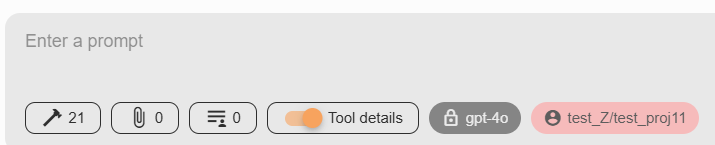
In the prompt area, a padlock icon may appear immediately before the model name (for example gpt-4o). That lock reflects data protection status for the current chat: it indicates that masking rules are in effect when protection is enabled for the persona.
Clicking the lock opens Data Protection Status. The dialog summarizes what was detected and how many values were masked, by entity type (for example email addresses, locations, organizations). Use Close when you are done reviewing.
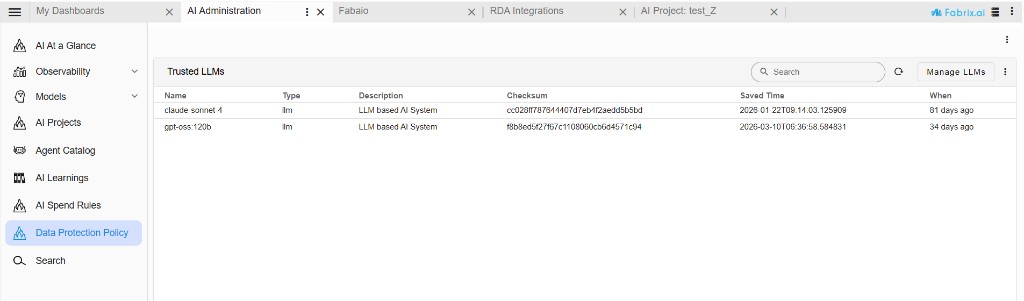
Data protection policy applies only to untrusted LLMs. Models you mark as trusted are exempt: they do not require a data protection policy for the same controls. In AI Administration, under Data Protection Policy, the Trusted LLMs list shows which models are treated as trusted. Conversations that use only trusted LLMs in line with your configuration do not need the masking flow described in Data protection in Fabaio.
2. Data-protection credentials
Data protection in Agentic AI is only available after you add the service in RDA integrations.
- Go to RDA integrations → Credentials.
- Select Add to create a new credential.
- Set Secret type to
data-protection(Data Protection Service used by Agentic AI). - Enter Name (required), optionally Tag name, and URL as required by your deployment.
- Select Save.
Until this data-protection credential exists, personas and Fabaio cannot use data protection features.