LLM Pooling
An LLM pool is a collection of multiple LLMs grouped together within a single pool. You can choose which individual LLMs belong in the pool; that pool can then be used elsewhere in the platform so users are not limited to a single model endpoint.
Agentic AI uses LLM pooling for load balancing and cost optimization: requests can be spread across multiple LLM endpoints based on usage and load, instead of routing everything through one model.
1. Creating an LLM pool in RDA integrations
When you add credentials for an LLM pool:
- Set Secret type to
llm-pool(a pool of LLM credentials). - Optionally set Tag name for labeling or filtering.
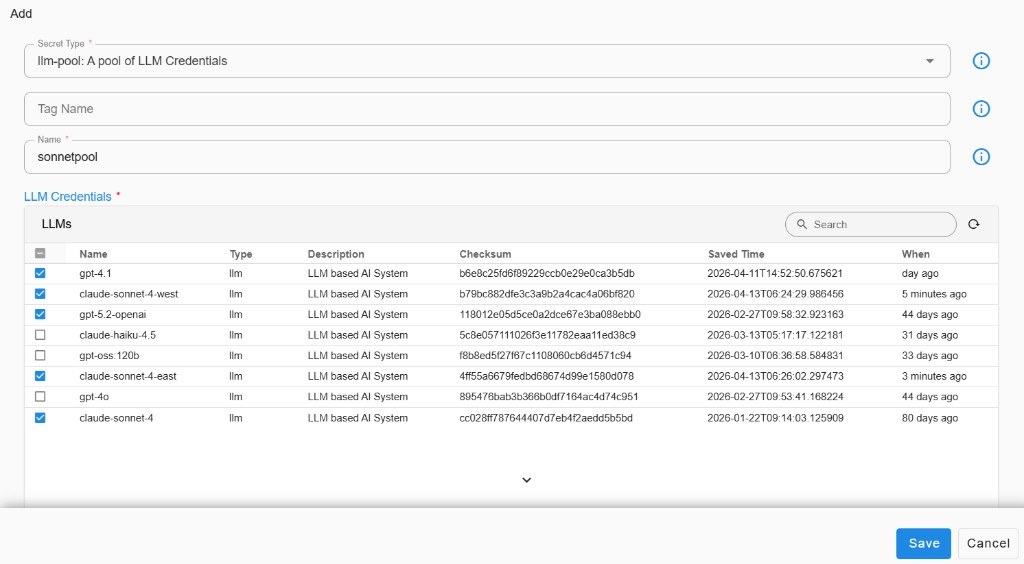
- Enter a Name for the pool (for example, sonnetpool).
- In the LLM credentials / LLMs table, select the models to include. Each row shows the model name, type (for example llm), description, checksum, saved time, and relative age. Use search or refresh if you need to find credentials in a long list.
- Configure Observability period (minutes) and Token usage threshold to control how usage is observed and when thresholds apply for the pool.
The Add flow below shows the secret type, pool name, and the LLM table used to pick which models are in the pool:
When an LLM-Pool is used for a conversation:
- Analyze token usage: Get total input token count for all models during the recent observability period
-
Select least-used model:
a. If multiple models have less than threshold tokens, choose one randomly
b. Otherwise, select the model with lowest token usage
2. Using the pool end-to-end
After you save the LLM pool credentials in RDA integrations:
- Add the LLM pool to the project that should use it.
- Add it to the persona that should use the pool.
- In Fabaio, start a conversation and select the LLM pool as the LLM so requests can use the pooled models according to your configuration.