Upgrade from 3.4.2 to 3.7.2 and 7.4.2 to 7.7.2
1. Upgrade From 3.4.2 to 3.7.2 and 7.4.2 to 7.7.2
-
RDAF Infra Upgrade: 1.0.3, 1.0.3.3 (haproxy)
-
RDAF Platform: From 3.4.2 to 3.7.2
-
AIOps (OIA) Application: From 7.4.2 to 7.7.2
-
RDAF Deployment
rdafk8sCLI: From 1.2.2 to 1.3.2 -
RDAF Client
rdacCLI: From 3.4.2 to 3.7.2
1.1. Prerequisites
Before proceeding with this upgrade, please make sure and verify the below prerequisites are met.
Currently deployed CLI and RDAF services are running the below versions.
-
RDAF Deployment CLI version: 1.2.2
-
Infra Services tag: 1.0.3 / 1.0.3.2 (haproxy)
-
Platform Services and RDA Worker tag: 3.4.2 / 3.4.2.x
-
OIA Application Services tag: 7.4.2 / 7.4.2.x
-
"/graphdb" mount point with 50GB disk should be available on all three infra nodes for GraphDB installation
-
CloudFabrix recommends taking VMware VM snapshots where RDA Fabric infra/platform/applications are deployed
Note
- Check the Disk space of all the Platform, Infra and Service Vm's using the below mentioned command, the highlighted disk size should be less than 80%
$ df -kh
Filesystem                         Size  Used Avail Use% Mounted on
udev                                32G     0   32G   0% /dev
tmpfs                              6.3G  357M  6.0G   6% /run
/dev/mapper/ubuntu--vg-ubuntu--lv   48G   12G   34G  26% /
tmpfs                               32G     0   32G   0% /dev/shm
tmpfs                              5.0M     0  5.0M   0% /run/lock
tmpfs                               32G     0   32G   0% /sys/fs/cgroup
/dev/loop0                          64M   64M     0 100% /snap/core20/2318
/dev/loop2                          92M   92M     0 100% /snap/lxd/24061
/dev/sda2                          1.5G  309M  1.1G  23% /boot
/dev/sdf                            50G  3.8G   47G   8% /var/mysql
/dev/loop3                          39M   39M     0 100% /snap/snapd/21759
/dev/sdg                            50G  541M   50G   2% /minio-data
/dev/loop4                          92M   92M     0 100% /snap/lxd/29619
/dev/loop5                          39M   39M     0 100% /snap/snapd/21465
/dev/sde                            15G  140M   15G   1% /zookeeper
/dev/sdd                            30G  884M   30G   3% /kafka-logs
/dev/sdc                            50G  3.3G   47G   7% /opt
/dev/sdb                            50G   29G   22G  57% /var/lib/docker
/dev/sdi                            25G  294M   25G   2% /graphdb
/dev/sdh                            50G   34G   17G  68% /opensearch
/dev/loop6                          64M   64M     0 100% /snap/core20/2379
- Check all MariaDB nodes are sync on HA setup using below commands before start upgrade
Tip
Please run the below commands on the VM host where RDAF deployment CLI was installed and rdafk8s setup command was run. The mariadb configuration is read from /opt/rdaf/rdaf.cfg file.
MARIADB_HOST=`cat /opt/rdaf/rdaf.cfg | grep -A3 mariadb | grep datadir | awk '{print $3}' | cut -f1 -d'/'`
MARIADB_USER=`cat /opt/rdaf/rdaf.cfg | grep -A3 mariadb | grep user | awk '{print $3}' | base64 -d`
MARIADB_PASSWORD=`cat /opt/rdaf/rdaf.cfg | grep -A3 mariadb | grep password | awk '{print $3}' | base64 -d`

mysql -u$MARIADB_USER -p$MARIADB_PASSWORD -h $MARIADB_HOST -P3307 -e "show status like 'wsrep_local_state_comment';"
Please verify that the mariadb cluster state is in Synced state.
+---------------------------+--------+
| Variable_name             | Value  |
+---------------------------+--------+
| wsrep_local_state_comment | Synced |
+---------------------------+--------+
Please run the below command and verify that the mariadb cluster size is 3.
mysql -u$MARIADB_USER -p$MARIADB_PASSWORD -h $MARIADB_HOST -P3307 -e "SHOW GLOBAL STATUS LIKE 'wsrep_cluster_size'";
+--------------------+-------+
| Variable_name      | Value |
+--------------------+-------+
| wsrep_cluster_size | 3     |
+--------------------+-------+
Warning
Make sure all of the above pre-requisites are met before proceeding with the upgrade process.
Warning
Kubernetes: Though Kubernetes based RDA Fabric deployment supports zero downtime upgrade, it is recommended to schedule a maintenance window for upgrading RDAF Platform and AIOps services to newer version.
Important
Please make sure full backup of the RDAF platform system is completed before performing the upgrade.
Kubernetes: Please run the below backup command to take the backup of application data.
Run the below command on RDAF Management system and make sure the Kubernetes PODs are NOT in restarting mode (it is applicable to only Kubernetes environment)
- Verify that RDAF deployment
rdafcli version is 1.2.2 on the VM where CLI was installed for docker on-prem registry managing Kubernetes deployments.
- On-premise docker registry service version is 1.0.3
ff6b1de8515f cfxregistry.CloudFabrix.io:443/docker-registry:1.0.3 "/entrypoint.sh /bin…" 7 days ago Up 7 days deployment-scripts-docker-registry-1
-
RDAF Infrastructure services version is 1.0.3 except for below services.
-
rda-minio: version is
RELEASE.2023-09-30T07-02-29Z -
haproxy: version is 1.0.3.2
Run the below command to get rdafk8s Infra service details
- RDAF Platform services version is 3.4.2.x
Run the below command to get RDAF Platform services details
- RDAF OIA Application services version is 7.4.2.x
Run the below command to get RDAF App services details
1.1.1 Update Pstream Settings
Warning
Before starting the upgrade of the RDAF platform's version to 3.7.2/7.7.2 release, please complete the below 2 steps which are mandatory.
-
Update the below mentioned pstream settings, before starting the upgrade of RDAF CLI from version 1.2.2 to 1.3.2. These steps are mandatory and only applicable if the CFX RDAF AIOps (OIA) application services are installed. Otherwise, please ignore them.
-
Migrate the Collaboration application service's data from the Database to Pstreams
- Navigate to Main Menu --> Configuration --> RDA Administration --> Persistent Streams --> Persistent Streams. Edit and update the pstream settings by copying the entire configuration as shown in the highlighted sections of the screenshots below.
a) oia-source-events-stream: Update the pstream settings by adding the field mappings (data type) for the below mentioned field names. These are newly introduced in this release upgrade. Additionally, add the filter retention_purge_extra_filter setting which is applied while purging the data.
- se_createdat
- se_sourcereceivedat
- se_updatedat
{
"unique_keys": [
    "se_id"
],
"computed_columns": {
    "customer_id": {
        "expr": "se_customerid"
    },
    "project_id": {
        "expr": "se_projectid"
    }
},
"_mappings": {
    "properties": {
        "se_createdat": {
            "type": "date"
        },
        "se_sourcereceivedat": {
            "type": "date"
        },
        "se_updatedat": {
            "type": "date"
        }
    }
},
"default_values": {
    "se_sourcesystemname": "Not Available",
    "se_status": "Not Available"
},
"retention_days": 3,
"retention_purge_extra_filter": "se_status != 'Failed' or timestamp is before -30 days",
"case_insensitive": true
}
b) oia-events-stream: Update the pstream settings by adding the field mappings (data type) for the below mentioned field names. These are newly introduced in this release upgrade. Additionally, add the filter retention_purge_extra_filter setting which is applied while purging the data.
- e_createdat
- e_sourcereceivedat
- e_updatedat
{
"unique_keys": [
    "e_id"
],
"computed_columns": {
    "customer_id": {
        "expr": "e_customerid"
    },
    "project_id": {
        "expr": "e_projectid"
    }
},
"_mappings": {
    "properties": {
        "e_createdat": {
            "type": "date"
        },
        "e_sourcereceivedat": {
            "type": "date"
        },
        "e_updatedat": {
            "type": "date"
        }
    }
},
"default_values": {
    "e_sourcesystemname": "Not Available",
    "e_eventstate": "Not Available",
    "e_status": "Not Available"
},
"retention_days": 3,
"retention_purge_extra_filter": "e_status != 'Failed' or timestamp is before -30 days",
"case_insensitive": true
}
c) oia-event-trail-stream: Update the pstream settings by adding the unique_keys as highlighted and the field mappings (data type) for the below mentioned field names. These are newly introduced in this release upgrade. Additionally, add the filter retention_purge_extra_filter setting which is applied while purging the data.
- et_createdat
{
"unique_keys": [
    "et_id"
],
"computed_columns": {
    "customer_id": {
        "expr": "et_customerid"
    },
    "project_id": {
        "expr": "et_projectid"
    }
},
"_mappings": {
    "properties": {
        "et_createdat": {
            "type": "date"
        }
    }
},
"retention_days": 3,
"retention_purge_extra_filter": "et_status != 'Failed'or timestamp is before -30 days",
"case_insensitive": true
}
1.1.2 Download the new Docker Images
Download the new docker image tags for RDAF Platform and OIA (AIOps) Application services and wait until all of the images are downloaded.
To fetch registry please use the below command
Note
If the Download of the images fail, Please re-execute the above command
Run the below command to verify above mentioned tags are downloaded for all of the RDAF Platform and OIA (AIOps) Application services.
Please make sure 1.0.3.3 image tag is downloaded for the below RDAF Infra services.
- rda-platform-haproxy
Please make sure 3.7.2 image tag is downloaded for the below RDAF Platform services.
- rda-client-api-server
- rda-registry
- rda-scheduler
- rda-collector
- rda-identity
- rda-fsm
- rda-asm
- rda-stack-mgr
- rda-access-manager
- rda-resource-manager
- rda-user-preferences
- onprem-portal
- onprem-portal-nginx
- rda-worker-all
- onprem-portal-dbinit
- cfxdx-nb-nginx-all
- rda-event-gateway
- rda-chat-helper
- rdac
- rdac-full
- cfxcollector
- bulk_stats
Please make sure 7.7.2 image tag is downloaded for the below RDAF OIA (AIOps) Application services.
- rda-app-controller
- rda-alert-processor
- rda-file-browser
- rda-smtp-server
- rda-ingestion-tracker
- rda-reports-registry
- rda-ml-config
- rda-event-consumer
- rda-webhook-server
- rda-irm-service
- rda-alert-ingester
- rda-collaboration
- rda-notification-service
- rda-configuration-service
- rda-alert-processor-companion
Please make sure 7.7.2.2 image tag is downloaded for the below RDAF OIA (AIOps) Application services.
- rda-alert-processor
- rda-event-consumer
- rda-irm-service
- rda-alert-ingester
- rda-collaboration
Downloaded Docker images are stored under the below path.
/opt/rdaf-registry/data/docker/registry/v2/ or /opt/rdaf/data/docker/registry/v2/
Run the below command to check the filesystem's disk usage on offline registry VM where docker images are pulled.
If necessary, older image tags that are no longer in use can be deleted to free up disk space using the command below.
Note
Run the command below if /opt occupies more than 80% of the disk space or if the free capacity of /opt is less than 25GB.
Important
Before setting up GraphDB make sure GraphDB isn't already installed, if its already installed please Ignore the below steps.
If the /opt/rdaf/rdaf.cfg file contains only GraphDB configuration entries, and the GraphDB service is either not running or the GraphDB mount point is not mounted, then remove the GraphDB entries from /opt/rdaf/rdaf.cfg.
Warning
For GraphDB installation, an additional disk must be provisioned on the RDA Fabric Infrastructure VMs. Click Here to perform this action
It is a pre-requisite and this step need to be completed before installing the GraphDB service.
- Please run the below python script to setup GraphDB
Note
1.Please take a backup of /opt/rdaf/deployment-scripts/values.yaml and /opt/rdaf/config/network_config/config.json
wget https://macaw-amer.s3.amazonaws.com/releases/rdaf-platform/1.2.2/rdaf_upgrade_120_121_to_122.py
It will ask for the IPs to set the GraphDB configs
If it is a cluster setup please provide all 3 infra IPs with comma separated. If it is a stand-alone setup please provide the IP of Infra VM.
Once provided the IP Address it will ask for the username and password, please enter the username and password and make a note of them for future usage.
1.1.3 Migrate Collaboration Service Data
Collaboration service's data migration from Database to Pstreams:
Please refer Collaboration service's data migration from Database to Pstream
Warning
Please proceed to the next step only after the Collaboration Service's data migration has completed successfully.
RDAF Deployment CLI Upgrade:
Please follow the below given steps.
Note
Upgrade RDAF Deployment CLI on both on-premise docker registry VM and RDAF Platform's management VM if provisioned separately.
Login into the VM where rdaf deployment CLI was installed for docker on-premise registry and managing Kubernetes or Non-kubernetes deployment.
- Download the RDAF Deployment CLI's newer version 1.3.2 bundle.
wget https://macaw-amer.s3.us-east-1.amazonaws.com/releases/rdaf-platform/1.3.2/rdafcli-1.3.2.tar.gz
- Upgrade the
rdafk8sCLI to version 1.3.2
- Verify the installed
rdafk8sCLI version is upgraded to 1.3.2
- Download the RDAF Deployment CLI's newer version 1.3.2 bundle and copy it to RDAF CLI management VM on which
rdafdeployment CLI was installed.
wget https://macaw-amer.s3.us-east-1.amazonaws.com/releases/rdaf-platform/1.3.2/offline-rhel-1.3.2.tar.gz
- Extract the
rdafCLI software bundle contents
- Change the directory to the extracted directory
- Upgrade the
rdafCLI to version 1.3.2
- Verify the installed
rdafCLI version
1.2. Upgrade Steps
1.2.1 Upgrade RDAF Infra Services
GraphDB Service Re-deployment:
Note
Issue: In the Kubernetes cluster environment, the shutdown and startup sequence of GraphDB services is causing the cluster to reinitialize by creating new Persistent Volumes (PVs) instead of using the existing ones. The redeployment steps below provide a solution to resolve this issue.
Below steps are only applicable if the GraphDB service was already deployed. Please ignore this step otherwise.
Warning
Please be aware that, post re-deploying the GraphDB service, topology nodes and edges data need to be re-ingested.
Note: The below steps of re-deploying the GraphDB service only applicable if it is already installed. If it is not installed, please skip and go to next step of downloading rdaf_upgrade_122_132.py script.
Important
Before proceeding with the upgrade steps please remove the existing GraphDB using the below mentioned commands.
Capture the GraphDB Node IPs running the command below.
Shutdown and delete the GrphDB service
rm /opt/rdaf/deployment-scripts/arangodb-storage.yaml /opt/rdaf/deployment-scripts/arangodb-cluster.yaml
Login to each GraphDB node (3 nodes) using SSH client and clean up the data under /graphdb mount point
Please download the below python script (rdaf_upgrade_122_132.py)
wget https://macaw-amer.s3.us-east-1.amazonaws.com/releases/rdaf-platform/1.3.2/rdaf_upgrade_122_132.py
The below step will generate values.yaml.latest files for all RDAF Infrastructure, Platform and Application services in the /opt/rdaf/deployment-scripts directory.
Note
On the CLI VM please make sure policy.json file exists in this path /opt/rdaf/config/network_config, If the policy.json file does not exist please copy it from the platform VM. Do SSH to Platform VM and execute the below command
scp -r /opt/rdaf/config/network_config/policy.json rdauser@<clivm IP>:/opt/rdaf/config/network_config
The upgrade script makes the below changes.
-
In this upgrade, the Redis configuration would get cleared in
values.yaml -
Copy the
/opt/rdaf/rdaf.cfgfile to all RDAF platform's infra, platform, application and worker service hosts, maintaining the same directory path. -
Copy the
/opt/rdaf/config/network_config/policy.jsonfile to both the platform and service hosts, maintaining the same directory path. -
The RDAF platform 3.7 release added support for
bulkstatsas part of it's performance management solution. Configuration related to the Bulkstats service has been added to the/opt/rdaf/deployment-scripts/values.yamlfile. -
In
haproxy.cfgfile backend mariadb section should look same as shown below, path of the file (on HAProxy VM:/opt/rdaf/config/haproxy/haproxy.cfg)
        backend mariadb
            mode tcp
            balance roundrobin
            option tcpka
            timeout server 28800s
            default-server inter 10s downinter 5s
            option external-check
            external-check command /maria_cluster_check
            server mariadb-192.168.133.97 192.168.133.97:3306 check backup
            server mariadb-192.168.133.98 192.168.133.98:3306 check
            server mariadb-192.168.133.99 192.168.133.99:3306 check backup
Note
The above config change is applicable only for HA Environments
Please follow the below steps to upgrade the configuration for below platform and OIA (AIOps) application services by updating the /opt/rdaf/deployment-scripts/values.yaml
- rda-portal-backend
- rda-fsm
- rda-alert-processor
- rda-collector
- haproxy
rda-portal-backend: Add the new environment variable CFX_URL_PREFIX to the portal_backend service. If the CFX_URL_PREFIX environment variable is already configured for the portal_frontend service (e.g., aiops), please ensure that the same value is applied to the portal_backend service as well. If no value is configured for CFX_URL_PREFIX, leave it empty.
| values.yaml.backup (existing config) | values.yaml (updated config) |
|---|---|
|
|
rda-fsm: Add the new environment variables KAFKA_CONSUMER_BATCH_MAX_SIZE and KAFKA_CONSUMER_BATCH_MAX_TIME_SECONDS to the rda_fsm service as highlighted below.
alert_processor: Add the new environment variables RDA_DB_CONNECTION_MAX_OVERFLOW and RDA_DB_CONNECTION_INITIAL_POOL_SIZE to the alert_processor service as highlighted below.
rda_collector: Set the privileged value to true and include the cap_add parameter in the new configuration. This adjustment ensures that the rda_collector service has the necessary permissions to collect the traces for debugging and troubleshooting purposes.
Note
The following settings apply to all RDAF platform and application services (excluding Infra services). Updating these settings is optional for this upgrade, but if possible, please make the updates.
| values.yaml.backup (existing config) | values.yaml (updated config) |
|---|---|
|
|
HAProxy Service:
Upgrade script adds the below highlighted lines in haproxy.cfg file under section backend webhook
HAProxy configuration file path : /opt/rdaf/config/haproxy/haproxy.cfg
Please verify the below highlighted changes are applied appropriately.
| haproxy.cfg (existing config) | haproxy.cfg (updated config) |
|---|---|
|
|
- Upgrade haproxy service using below command.
- Install the GraphDB service using below command
- Please use the below mentioned command to see haproxy & graphdb is up and in Running state.
arango-rda-arangodb-operator-59d7d756dc-9wwr9    1/1     Running   0               5d18h
arango-rda-arangodb-operator-59d7d756dc-ptps8    1/1     Running   0               5d18h
rda-arangodb-agnt-0-b9a0bb                       1/1     Running   0               5d18h
rda-arangodb-agnt-1-b9a0bb                       1/1     Running   0               5d18h
rda-arangodb-agnt-2-b9a0bb                       1/1     Running   0               5d18h
rda-arangodb-crdn-cl3srcn2-b9a0bb                1/1     Running   0               5d18h
rda-arangodb-crdn-m1rg9pgg-b9a0bb                1/1     Running   0               5d18h
rda-arangodb-crdn-oimic8ol-b9a0bb                1/1     Running   0               5d18h
rda-arangodb-prmr-0-b9a0bb                       1/1     Running   0               5d18h
rda-arangodb-prmr-1-b9a0bb                       1/1     Running   0               5d18h
rda-arangodb-prmr-2-b9a0bb                       1/1     Running   0               5d18h
+--------------------+----------------+---------------+--------------+--------------------+
| Name               | Host           | Status        | Container Id | Tag                |
+--------------------+----------------+---------------+--------------+--------------------+
| haproxy            | 192.168.108.13 | Up 29 hours   | ed35bcfb0fa2 | 1.0.3.3            |
| haproxy            | 192.168.108.14 | Up 29 hours   | 578e366b280e | 1.0.3.3            |
| keepalived         | 192.168.108.13 | active        | N/A          | N/A                |
| keepalived         | 192.168.108.14 | active        | N/A          | N/A                |
| rda-nats           | 192.168.108.13 | Up 1 Days ago | 0083a214d582 | 1.0.3              |
| rda-nats           | 192.168.108.14 | Up 1 Days ago | 37aee17fa16e | 1.0.3              |
| rda-minio          | 192.168.108.13 | Up 1 Days ago | c9732a779a20 | RELEASE.2023-09-30 |
|                    |                |               |              | T07-02-29Z         |
......
......
......
| rda-graphdb[agent] | 192.168.108.13 | Up 1 Days ago | 49153a8d2044 | 1.0.3              |
| rda-graphdb[coordi | 192.168.108.13 | Up 1 Days ago | 9e25838e7c35 | 1.0.3              |
| nator]             |                |               |              |                    |
| rda-               | 192.168.108.13 | Up 1 Days ago | 646b32b07e14 | 1.0.3              |
| graphdb[server]    |                |               |              |                    |
| rda-               | 192.168.108.14 | Up 1 Days ago | 7e64251897b3 | 1.0.3              |
| graphdb[operator]  |                |               |              |                    |
| rda-graphdb[agent] | 192.168.108.14 | Up 1 Days ago | babda2808d56 | 1.0.3              |
| rda-graphdb[coordi | 192.168.108.14 | Up 1 Days ago | f967c810a039 | 1.0.3              |
| nator]             |                |               |              |                    |
| rda-               | 192.168.108.14 | Up 1 Days ago | cacfb6f9aa55 | 1.0.3              |
| graphdb[server]    |                |               |              |                    |
| rda-               | 192.168.108.16 | Up 1 Days ago | 6dc86979daa8 | 1.0.3              |
| graphdb[operator]  |                |               |              |                    |
| rda-graphdb[agent] | 192.168.108.16 | Up 1 Days ago | f25a254e9c50 | 1.0.3              |
| rda-graphdb[coordi | 192.168.108.16 | Up 1 Days ago | d8c6a4b5143c | 1.0.3              |
| nator]             |                |               |              |                    |
| rda-               | 192.168.108.16 | Up 1 Days ago | 9ab70685761d | 1.0.3              |
| graphdb[server]    |                |               |              |                    |
+--------------------+----------------+---------------+--------------+--------------------+
- Run the below script to update the OpenSearch user permissions
wget https://macaw-amer.s3.us-east-1.amazonaws.com/releases/rdaf-platform/1.3.2/opensearch_policy_permissions.py
Note
Please make sure socat command is availabe on all RDAF Infrastructure service nodes. Without this command utility, the below python script may fail.
- Please execute the command shown below in the CLI VM
Note
The expected output of the above command will be similar to the below output
Updating the opensearch policy user permissions...

{"status":"OK","message":"'role-38fb12901221480083eaf050d44c839b-dataplane-policy' updated."}
1.2.2 Upgrade RDAF Platform Services
Step-1: Run the below command to initiate upgrading RDAF Platform services.
As the upgrade procedure is a non-disruptive upgrade, it puts the currently running PODs into Terminating state and newer version PODs into Pending state.
Step-2: Run the below command to check the status of the existing and newer PODs and make sure atleast one instance of each Platform service is in Terminating state.
Step-3: Run the below command to put all Terminating RDAF platform service PODs into maintenance mode. It will list all of the POD Ids of platform services along with rdac maintenance command that required to be put in maintenance mode.
Note
If **maint_command.py** script doesn't exist on RDAF deployment CLI VM, it can be downloaded using the below command.

```
wget https://macaw-amer.s3.amazonaws.com/releases/rdaf-platform/1.1.6/maint_command.py
```
Step-4: Copy & Paste the rdac maintenance command as below.
Step-5: Run the below command to verify the maintenance mode status of the RDAF platform services.
Step-6: Run the below command to delete the Terminating RDAF platform service PODs
for i in `kubectl get pods -n rda-fabric -l app_category=rdaf-platform | grep 'Terminating' | awk '{print $1}'`; do kubectl delete pod $i -n rda-fabric --force; done
Note
Wait for 120 seconds and Repeat above steps from Step-2 to Step-6 for rest of the RDAF Platform service PODs.
Please wait till all of the new platform service PODs are in Running state and run the below command to verify their status and make sure all of them are running with 3.7 version.
+--------------------+----------------+-------------------+--------------+-------+
| Name               | Host           | Status            | Container Id | Tag   |
+--------------------+----------------+-------------------+--------------+-------+
| rda-api-server     | 192.168.131.44 | Up 44 Minutes ago | 805af438ecd7 | 3.7.2 |
| rda-api-server     | 192.168.131.45 | Up 46 Minutes ago | 6e5a3c39bff7 | 3.7.2 |
| rda-registry       | 192.168.131.45 | Up 46 Minutes ago | 74495e4433b3 | 3.7.2 |
| rda-registry       | 192.168.131.44 | Up 46 Minutes ago | 33fe895b8f77 | 3.7.2 |
| rda-identity       | 192.168.131.44 | Up 46 Minutes ago | 0be64a850f29 | 3.7.2 |
| rda-identity       | 192.168.131.47 | Up 45 Minutes ago | cc236ec05df8 | 3.7.2 |
| rda-fsm            | 192.168.131.44 | Up 46 Minutes ago | 57a58b24e479 | 3.7.2 |
| rda-fsm            | 192.168.131.45 | Up 46 Minutes ago | d107bbf2f1ee | 3.7.2 |
| rda-asm            | 192.168.131.44 | Up 46 Minutes ago | d1a10d8d2b5f | 3.7.2 |
| rda-asm            | 192.168.131.45 | Up 46 Minutes ago | 723e48495a05 | 3.7.2 |
| rda-asm            | 192.168.131.47 | Up 2 Weeks ago    | 130b6c27f794 | 3.7.2 |
| rda-asm            | 192.168.131.46 | Up 2 Weeks ago    | 7dab62106a42 | 3.7.2 |
| rda-chat-helper    | 192.168.131.44 | Up 46 Minutes ago | 4967ce0a0c70 | 3.7.2 |
| rda-chat-helper    | 192.168.131.45 | Up 45 Minutes ago | 5bf0c0d2ce0c | 3.7.2 |
| rda-access-manager | 192.168.131.45 | Up 46 Minutes ago | 39e325e5307b | 3.7.2 |
| rda-access-manager | 192.168.131.46 | Up 45 Minutes ago | 166498466a71 | 3.7.2 |
| rda-resource-      | 192.168.131.44 | Up 45 Minutes ago | 9758013b204f | 3.7.2 |
| manager            |                |                   |              |       |
| rda-resource-      | 192.168.131.45 | Up 45 Minutes ago | e62ee21f5ea2 | 3.7.2 |
| manager            |                |                   |              |       |
+--------------------+----------------+-------------------+--------------+-------+
Run the below command to check the rda-scheduler service is elected as a leader under Site column.
+-------+----------------------------------------+-------------+--------------+----------+-------------+-----------------+--------+--------------+---------------+--------------+
| Cat   | Pod-Type                               | Pod-Ready   | Host         | ID       | Site        | Age             |   CPUs |   Memory(GB) | Active Jobs   | Total Jobs   |
|-------+----------------------------------------+-------------+--------------+----------+-------------+-----------------+--------+--------------+---------------+--------------|
| Infra | api-server                             | True        | rda-api-server | 9c0484af |             | 11:41:50 |      8 |        31.33 |               |              |
| Infra | api-server                             | True        | rda-api-server | 196558ed |             | 11:40:23 |      8 |        31.33 |               |              |
| Infra | asm                                    | True        | rda-asm-5b8fb9 | bcbdaae5 |             | 11:42:26 |      8 |        31.33 |               |              |
| Infra | asm                                    | True        | rda-asm-5b8fb9 | 232a58af |             | 11:42:40 |      8 |        31.33 |               |              |
| Infra | collector                              | True        | rda-collector- | d06fb56c |             | 11:42:03 |      8 |        31.33 |               |              |
| Infra | collector                              | True        | rda-collector- | a4c79e4c |             | 11:41:59 |      8 |        31.33 |               |              |
| Infra | registry                               | True        | rda-registry-6 | 2fd69950 |             | 11:42:03 |      8 |        31.33 |               |              |
| Infra | registry                               | True        | rda-registry-6 | fac544d6 |             | 11:41:59 |      8 |        31.33 |               |              |
| Infra | scheduler                              | True        | rda-scheduler- | b98afe88 | *leader*    | 11:42:01 |      8 |        31.33 |               |              |
| Infra | scheduler                              | True        | rda-scheduler- | e25a0841 |             | 11:41:56 |      8 |        31.33 |               |              |
| Infra | worker                                 | True        | rda-worker-5b5 | 99bd054e | rda-site-01 | 11:33:40 |      8 |        31.33 | 0             | 0            |
| Infra | worker                                 | True        | rda-worker-5b5 | 0bfdcd98 | rda-site-01 | 11:33:34 |      8 |        31.33 | 0             | 0            |
+-------+----------------------------------------+-------------+----------------+----------+-------------+----------+--------+--------------+---------------+--------------+
Run the below command to check if all services has ok status and does not throw any failure messages.
Redis service cleanup:
Run the Python script mentioned below to clean up the redis infrastructure service. This script will:
- Shut down the redis service.
- Clear configuration data in
/opt/rdaf/rdaf.cfg,/opt/rdaf/deployment-scripts/redis-values.yaml, andhelm/redis - Uninstall the service using Helm.
- Remove Persistent Volume Claims (PVCs) and Persistent Volumes (PVs).
- Infrastructure service is deprecated and no longer needed, the Redis service related PODs gets deleted
- Run the below mentioned command to check if redis service PODs are decommissioned.
1.2.2.1 Install RDAF Bulkstats Services (Optional)
Note
The RDAF Bulkstats service is optional and only necessary if the Bulkstats data ingestion feature is required. Otherwise, you may ignore the steps below and go to next section.
Run the below command to install bulk_stats services
A comma can be used to identify two hosts for HA Setups.
Note
When deploying bulk stats on New VM, make sure the username and password matches with the existing VM's
Run the below command to get the bulk_stats status
+----------------+----------------+---------------+--------------+-------+
| Name           | Host           | Status        | Container Id | Tag   |
+----------------+----------------+---------------+--------------+-------+
| rda-bulk-stats | 192.168.108.13 | Up 1 Days ago | ac3379bfcc9d | 3.7.2 |
| rda-bulk-stats | 192.168.108.14 | Up 1 Days ago | c78283c06d88 | 3.7.2 |
+----------------+----------------+---------------+--------------+-------+
1.2.3 Upgrade rdac CLI
Run the below command to upgrade the rdac CLI
1.2.4 Upgrade RDA Worker Services
Note
If the worker was deployed in a HTTP proxy environment, please make sure the required HTTP proxy environment variables are added in /opt/rdaf/deployment-scripts/values.yaml file under rda_worker configuration section as shown below before upgrading RDA Worker services.
rda_worker:
    terminationGracePeriodSeconds: 300
    replicas: 6
    sizeLimit: 1024Mi
    privileged: true
    resources:
    requests:
        memory: 100Mi
    limits:
        memory: 24Gi
    env:
    WORKER_GROUP: rda-prod-01
    CAPACITY_FILTER: cpu_load1 <= 7.0 and mem_percent < 95
    MAX_PROCESSES: '1000'
    RDA_ENABLE_TRACES: 'no'
    WORKER_PUBLIC_ACCESS: 'true'
    DISABLE_REMOTE_LOGGING_CONTROL: 'no'
    RDA_SELF_HEALTH_RESTART_AFTER_FAILURES: 3
    extraEnvs:
    - name: http_proxy
    value: http://test:1234@192.168.122.107:3128
    - name: https_proxy
    value: http://test:1234@192.168.122.107:3128
    - name: HTTP_PROXY
    value: http://test:1234@192.168.122.107:3128
    - name: HTTPS_PROXY
    value: http://test:1234@192.168.122.107:3128
    ....
    ....
Step-1: Please run the below command to initiate upgrading the RDA Worker service PODs.
Step-2: Run the below command to check the status of the existing and newer PODs and make sure atleast one instance of each RDA Worker service POD is in Terminating state.
NAME                          READY   STATUS    RESTARTS   AGE
rda-worker-77f459d5b9-9kdmg   1/1     Running   0          73m
rda-worker-77f459d5b9-htsmr   1/1     Running   0          74m
Step-3: Run the below command to put all Terminating RDAF worker service PODs into maintenance mode. It will list all of the POD Ids of RDA worker services along with rdac maintenance command that is required to be put in maintenance mode.
Step-4: Copy & Paste the rdac maintenance command as below.
Step-5: Run the below command to verify the maintenance mode status of the RDAF worker services.
Step-6: Run the below command to delete the Terminating RDAF worker service PODs
for i in `kubectl get pods -n rda-fabric -l app_component=rda-worker | grep 'Terminating' | awk '{print $1}'`; do kubectl delete pod $i -n rda-fabric --force; done
Note
Wait for 120 seconds between each RDAF worker service upgrade by repeating above steps from Step-2 to Step-6 for rest of the RDAF worker service PODs.
Step-7: Please wait for 120 seconds to let the newer version of RDA Worker service PODs join the RDA Fabric appropriately. Run the below commands to verify the status of the newer RDA Worker service PODs.
+------------+----------------+---------------+--------------+---------+
| Name       | Host           | Status        | Container Id | Tag     |
+------------+----------------+---------------+--------------+---------+
| rda-worker | 192.168.108.17 | Up 1 Hour ago | 4b36fc814a3c | 3.7.2   |
| rda-worker | 192.168.108.18 | Up 1 Hour ago | 53c5a8a4c420 | 3.7.2   |
+------------+----------------+---------------+--------------+---------+
Step-8: Run the below command to check if all RDA Worker services has ok status and does not throw any failure messages.
1.2.5 Update Environment Variables in values.yml
Step 1: Alert Ingester- Add Environment Variables
-
Before upgrading the Alert Ingester service, ensure the following environment variables are added under the alert_ingester section in the values.yml file. file path
/opt/rdaf/deployment-scripts/values.yml -
Environment Variables to Add
alert_ingester:
  replicas: 2
  privileged: false
  resources:
    requests:
      memory: 100Mi
    limits:
      memory: 16Gi
  env:
    RDA_ENABLE_TRACES: 'no'
    DISABLE_REMOTE_LOGGING_CONTROL: 'no'
    RDA_SELF_HEALTH_RESTART_AFTER_FAILURES: 3
    PYTHONFAULTHANDLER: 'true'
  extraEnvs:
  - name: INBOUND_PARTITION_WORKERS_MAX
    value: '3'
  - name: OUTBOUND_TOPIC_WORKERS_MAX
    value: '3'
Step 2: Collaboration Service- Memory Configuration Update
- Update the memory limit for the collaboration service in the same values.yml file
| Previous Value | Updated Value |
|---|---|
|
|
|
Step 3: Event Consumer- Add Environment Variable
-
Before upgrading the event consumer service, add the following environment variable under the
event_consumersection ofvalues.yml. -
Environment Variable to Add
event_consumer:
  replicas: 2
  privileged: false
  resources:
    requests:
      memory: 100Mi
    limits:
      memory: 8Gi
  env:
    RDA_ENABLE_TRACES: 'no'
    DISABLE_REMOTE_LOGGING_CONTROL: 'no'
    RDA_SELF_HEALTH_RESTART_AFTER_FAILURES: 3
    PYTHONFAULTHANDLER: 'true'
  extraEnvs:
    - name: OUTBOUND_WORKERS_MAX
      value: '5'
1.2.6 Upgrade OIA Application Services
Step-1: Run the below commands to initiate upgrading RDAF OIA Application services
rdafk8s app upgrade OIA --tag 7.7.2 --service rda-app-controller --service rda-reports-registry --service rda-file-browser --service rda-configuration-service --service rda-ml-config --service rda-notification-service --service rda-webhook-server --service rda-smtp-server --service rda-ingestion-tracker --service rda-alert-processor-companion
rdafk8s app upgrade OIA --tag 7.7.2.2 --service rda-alert-ingester --service rda-event-consumer --service rda-alert-processor --service rda-irm-service --service rda-collaboration
Step-2: Run the below command to check the status of the newly upgraded PODs.
Step-3: Run the below command to put all Terminating OIA application service PODs into maintenance mode. It will list all of the POD Ids of OIA application services along with rdac maintenance command that are required to be put in maintenance mode.
Step-4: Copy & Paste the rdac maintenance command as below.
Step-5: Run the below command to verify the maintenance mode status of the OIA application services.
Step-6: Run the below command to delete the Terminating OIA application service PODs
for i in `kubectl get pods -n rda-fabric -l app_name=oia | grep 'Terminating' | awk '{print $1}'`; do kubectl delete pod $i -n rda-fabric --force; done
Note
Wait for 120 seconds and Repeat above steps from Step-2 to Step-6 for rest of the OIA application service PODs.
Please wait till all of the new OIA application service PODs are in Running state and run the below command to verify their status and make sure they are running with 7.7 version.
+--------------------+----------------+-------------------+--------------+---------+
| Name               | Host           | Status            | Container Id | Tag     |
+--------------------+----------------+-------------------+--------------+---------+
| rda-alert-ingester | 192.168.131.47 | Up 54 Minutes ago | 4c38f1f1ab76 | 7.7.2   |
| rda-alert-ingester | 192.168.131.49 | Up 49 Minutes ago | 2c55eda2dd7a | 7.7.2   |
| rda-alert-         | 192.168.131.49 | Up 44 Minutes ago | 8319c5927e29 | 7.7.2   |
| processor          |                |                   |                        |
| rda-alert-         | 192.168.131.50 | Up 54 Minutes ago | e99d07f8bcd6 | 7.7.2   |
| processor          |                |                   |                        |
| rda-alert-         | 192.168.131.47 | Up 54 Minutes ago | d16d8fae566c | 7.7.2   |
| processor-         |                |                   |                        |
| companion          |                |                   |                        |
| rda-alert-         | 192.168.131.49 | Up 48 Minutes ago | 16f12b91060d | 7.7.2   |
| processor-         |                |                   |                        |
| companion          |                |                   |                        |
| rda-app-controller | 192.168.131.47 | Up 54 Minutes ago | 658a64049e35 | 7.7.2   |
| rda-app-controller | 192.168.131.46 | Up 54 Minutes ago | 1c27230025a1 | 7.7.2   |
| rda-collaboration  | 192.168.131.49 | Up 43 Minutes ago | 32ea58ca8e39 | 7.7.2   |
| rda-collaboration  | 192.168.131.50 | Up 53 Minutes ago | 67a5e5ef8c1d | 7.7.2   |
| rda-configuration- | 192.168.131.46 | Up 54 Minutes ago | af292efd663c | 7.7.2   |
| service            |                |                   |                        |
| rda-configuration- | 192.168.131.49 | Up 51 Minutes ago | 7b23b8f033a6 | 7.7.2   |
| service            |                |                   |                        |
+--------------------+----------------+-------------------+--------------+---------+
Step-7: Run the below command to verify all OIA application services are up and running.
+-------+----------------------------------------+-------------+----------------+----------+-------------+----------+--------+--------------+---------------+--------------+
| Cat   | Pod-Type                               | Pod-Ready   | Host           | ID       | Site        | Age      |   CPUs |   Memory(GB) | Active Jobs   | Total Jobs   |
|-------+----------------------------------------+-------------+----------------+----------+-------------+----------+--------+--------------+---------------+--------------|
| App   | alert-ingester                         | True        | rda-alert-inge | 6a6e464d |             | 19:19:06 |      8 |        31.33 |               |              |
| App   | alert-ingester                         | True        | rda-alert-inge | 7f6b42a0 |             | 19:19:23 |      8 |        31.33 |               |              |
| App   | alert-processor                        | True        | rda-alert-proc | a880e491 |             | 19:19:51 |      8 |        31.33 |               |              |
| App   | alert-processor                        | True        | rda-alert-proc | b684609e |             | 19:19:48 |      8 |        31.33 |               |              |
| App   | alert-processor-companion              | True        | rda-alert-proc | 874f3b33 |             | 19:18:54 |      8 |        31.33 |               |              |
| App   | alert-processor-companion              | True        | rda-alert-proc | 70cadaa7 |             | 19:18:35 |      8 |        31.33 |               |              |
| App   | asset-dependency                       | True        | rda-asset-depe | bde06c15 |             | 19:44:20 |      8 |        31.33 |               |              |
| App   | asset-dependency                       | True        | rda-asset-depe | 47b9eb02 |             | 19:44:08 |      8 |        31.33 |               |              |
| App   | authenticator                          | True        | rda-identity-d | faa33e1b |             | 19:44:22 |      8 |        31.33 |               |              |
| App   | authenticator                          | True        | rda-identity-d | 36083c36 |             | 19:44:16 |      8 |        31.33 |               |              |
| App   | cfx-app-controller                     | True        | rda-app-contro | 5fd3c3f4 |             | 19:19:39 |      8 |        31.33 |               |              |
| App   | cfx-app-controller                     | True        | rda-app-contro | d66e5ce8 |             | 19:19:26 |      8 |        31.33 |               |              |
| App   | cfxdimensions-app-access-manager       | True        | rda-access-man | ecbb535c |             | 19:44:16 |      8 |        31.33 |               |              |
| App   | cfxdimensions-app-access-manager       | True        | rda-access-man | 9a05db5a |             | 19:44:06 |      8 |        31.33 |               |              |
| App   | cfxdimensions-app-collaboration        | True        | rda-collaborat | 61b3c53b |             | 19:18:48 |      8 |        31.33 |               |              |
| App   | cfxdimensions-app-collaboration        | True        | rda-collaborat | 09b9474e |             | 19:18:27 |      8 |        31.33 |               |              |
+-------+----------------------------------------+-------------+----------------+----------+-------------+-------------------+--------+-----------------------------+--------------+
Run the below command to check if all services has ok status and does not throw any failure messages.
+-----------+----------------------------------------+--------------+----------+-------------+-----------------------------------------------------+----------+-----------------------------------------------------------------------------------------------------------------------------+
| Cat       | Pod-Type                               | Host         | ID       | Site        | Health Parameter                                    | Status   | Message                                                                                                                     |
|-----------+----------------------------------------+--------------+----------+-------------+-----------------------------------------------------+----------+-----------------------------------------------------------------------------------------------------------------------------|
| rda_app   | alert-ingester                         | rda-alert-in | 6a6e464d |             | service-status                                      | ok       |                                                                                                                             |
| rda_app   | alert-ingester                         | rda-alert-in | 6a6e464d |             | minio-connectivity                                  | ok       |                                                                                                                             |
| rda_app   | alert-ingester                         | rda-alert-in | 6a6e464d |             | service-dependency:configuration-service            | ok       | 2 pod(s) found for configuration-service                                                                                    |
| rda_app   | alert-ingester                         | rda-alert-in | 6a6e464d |             | service-initialization-status                       | ok       |                                                                                                                             |
| rda_app   | alert-ingester                         | rda-alert-in | 6a6e464d |             | kafka-connectivity                                  | ok       | Cluster=dKnnkaYSPELK8DBUk0rPig, Broker=0, Brokers=[0, 1, 2]                                                                 |
| rda_app   | alert-ingester                         | rda-alert-in | 6a6e464d |             | kafka-consumer                                      | ok       | Health: [{'387c0cb507b84878b9d0b15222cb4226.inbound-events': 0, '387c0cb507b84878b9d0b15222cb4226.mapped-events': 0}, {}]   |
| rda_app   | alert-ingester                         | rda-alert-in | 7f6b42a0 |             | service-status                                      | ok       |                                                                                                                             |
| rda_app   | alert-ingester                         | rda-alert-in | 7f6b42a0 |             | minio-connectivity                                  | ok       |                                                                                                                             |
| rda_app   | alert-ingester                         | rda-alert-in | 7f6b42a0 |             | service-dependency:configuration-service            | ok       | 2 pod(s) found for configuration-service                                                                                    |
| rda_app   | alert-ingester                         | rda-alert-in | 7f6b42a0 |             | service-initialization-status                       | ok       |                                                                                                                             |
| rda_app   | alert-ingester                         | rda-alert-in | 7f6b42a0 |             | kafka-consumer                                      | ok       | Health: [{'387c0cb507b84878b9d0b15222cb4226.inbound-events': 0, '387c0cb507b84878b9d0b15222cb4226.mapped-events': 0}, {}]   |
| rda_app   | alert-ingester                         | rda-alert-in | 7f6b42a0 |             | kafka-connectivity                                  | ok       | Cluster=dKnnkaYSPELK8DBUk0rPig, Broker=1, Brokers=[0, 1, 2]                                                                 |
| rda_app   | alert-processor                        | rda-alert-pr | a880e491 |             | service-status                                      | ok       |                                                                                                                             |
| rda_app   | alert-processor                        | rda-alert-pr | a880e491 |             | minio-connectivity                                  | ok       |                                                                                                                             |
| rda_app   | alert-processor                        | rda-alert-pr | a880e491 |             | service-dependency:cfx-app-controller               | ok       | 2 pod(s) found for cfx-app-controller                                                                                       |
| rda_app   | alert-processor                        | rda-alert-pr | a880e491 |             | service-dependency:configuration-service            | ok       | 2 pod(s) found for configuration-service                                                                                    |
| rda_app   | alert-processor                        | rda-alert-pr | a880e491 |             | service-initialization-status                       | ok       |                                                                                                                             |
| rda_app   | alert-processor                        | rda-alert-pr | a880e491 |             | kafka-connectivity                                  | ok       | Cluster=dKnnkaYSPELK8DBUk0rPig, Broker=1, Brokers=[0, 1, 2]                                                                 |
| rda_app   | alert-processor                        | rda-alert-pr | a880e491 |             | DB-connectivity                                     | ok       |                                                                                                                             |
+-----------+----------------------------------------+--------------+----------+-------------+-----------------------------------------------------+----------+-------------------------------------------------------------+
1.2.7 Setup & Install Self Monitoring
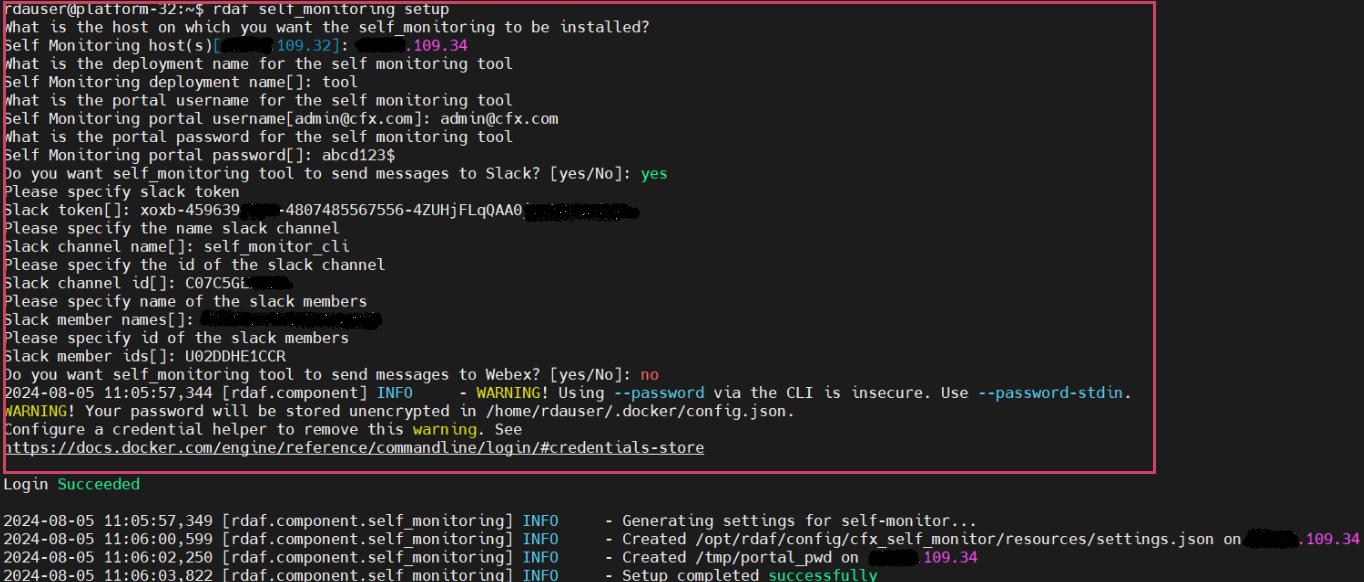
In RDAF platform version 3.7.2, the RDAF CLI now supports installing and configuring the self_monitoring service. This service helps monitor the functional health of RDAF platform services and sends notifications via Slack, Webex Teams, or other collaboration tools.
For detailed information, please refer CFX Self Monitor Service
- Please run the below command to setup Self Monitoring
The user must enter the necessary parameters as indicated in the screenshot below Example.
- Run the below command to install Self Monitoring
- Run the below command to verify the status
+------------------+----------------+-------------+--------------+---------+
| Name             | Host           | Status      | Container Id | Tag     |
+------------------+----------------+-------------+--------------+---------+
| cfx_self_monitor | 192.168.108.20 | Up 2  hours | 501de41db006 | 3.7.2   |
+------------------+----------------+-------------+--------------+---------+
1.3.Post Upgrade Steps
1. Deploy latest Alerts and Incidents Dashboard configuration
Go to Main Menu --> Configuration --> RDA Administration --> Bundles --> Select oia_l1_l2_bundle and Click on Deploy action to deploy the latest Dashboards configuration for Alerts and Incidents.
2. Create the Database for Topology in GraphDB
Go to Main Menu --> Configuration --> RDA Administration --> GraphDB --> Graphs --> Click on Add action button --> Enter Database Name as cfx_rdaf_topology and Click on Save button.
3. Deploy latest Latest Topology configuration
Go to Main Menu --> Configuration --> RDA Administration --> Bundles --> Click Deploy action row level for topology_path_viz_bundle
4. Run below curl command to add _RDA_Id column in rdaf-services-logs pstream
Note
The above step needs to be executed if log monitoring is already installed in previous releases
curl -s -k -X PUT -u "openserachusername:password" "https://opensearch running host IP:9200/index name of the pstream/_mapping" -H "Content-Type: application/json" -d '
{"properties": {

                    "_RDA_Id": {
                        "type": "text",
                        "fields": {
                            "keyword": {
                                "type": "keyword"
                            }
                        }
                    }
}
}
'
curl -s -k -X PUT -u "testuser:a*****4" "https://192.168.109.50:9200/98e005500460423c886d8e30d8a9acf6-stream-rdaf-services-logs/_mapping" -H "Content-Type: application/json" -d '
{"properties": {

                    "_RDA_Id": {
                        "type": "text",
                        "fields": {
                            "keyword": {
                                "type": "keyword"
                            }
                        }
                    }
}
}
'
Note
The above step needs to be executed if log monitoring is already installed in previous releases
For the document on Alert Dashboard Changes from 7.4.2 to 7.7, Please Click Here
Note
If any custom dashboards were made for Alert Dashboards in the previous release(7.4.2), only then the above mentioned Alert Dashboard Changes is necessary. If not, step 1 will handle the Alert Dashboard Changes.
For the document on GraphDB if its already installed, we have a new feature in UI to access GraphDB data, for more details on this Please Click Here
Note
Make sure that the purging durations for both the database and Pstream are aligned. For the document on Purge Configuration please Click Here
Streams:
-
oia-incidents-stream
-
oia-alerts-stream